February 2003
Intermediate to advanced
352 pages
9h
English
Going beyond the obvious in reading Google search results.
You’d think a list of search results would be pretty straightforward, wouldn’t you—just a page title and a link, possibly a summary? Not so with Google. Google encompasses so many search properties and has so much data at its disposal that it fills every results page to the rafters. Within a typical search result you can find sponsored links, ads, links to stock quotes, page sizes, spelling suggestions, and more.
By knowing more of the nitty gritty details of what’s what in a search result, you’ll be able to make some guesses (“Wow, this page that links to my page is very large; perhaps it’s a link list”) and correct roadblocks (“I can’t find my search term on this page; I’ll check the version Google has cached”). Furthermore, if you have a good idea what Google provides on its standard search results page, you’ll have more of an idea of what’s available to you via the Google API.
Let’s use the word
“flowers” to examine this anatomy.
Figure 1-2 shows the result page for
flowers.
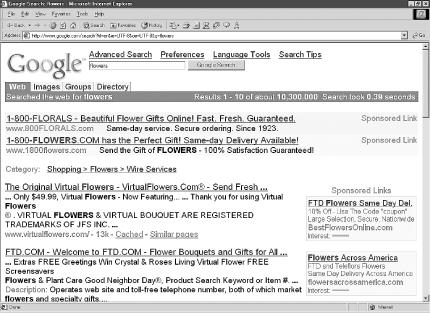
Figure 1-2. Result page for “flowers”
First, you’ll note at the top of the page is a selection of tabs, allowing you to repeat your search across other Google searches, including Google Groups [Hack #30], Google Images [Hack #31], and the Google Directory. Beneath that you’ll see a count for the number of results and how ...
Read now
Unlock full access


 O’Reilly covers everything we've got, with content to help us build a world-class technology community, upgrade the capabilities and competencies of our teams, and improve overall team performance as well as their engagement.I wanted to learn C and C++, but it didn't click for me until I picked up an O'Reilly book. When I went on the O’Reilly platform, I was astonished to find all the books there, plus live events and sandboxes so you could play around with the technology.I’ve been on the O’Reilly platform for more than eight years. I use a couple of learning platforms, but I'm on O'Reilly more than anybody else. When you're there, you start learning. I'm never disappointed.I'm always learning. So when I got on to O'Reilly, I was like a kid in a candy store. There are playlists. There are answers. There's on-demand training. It's worth its weight in gold, in terms of what it allows me to do.