November 2015
Beginner
843 pages
29h 44m
English
FTP (file transfer protocol) sites store pieces of software that can be accessed from the Internet. If you’ve heard of FTP at all, it was probably under one of two circumstances—either you’ve downloaded software from an Internet FTP site, or you’ve created and maintained your own website.
Hooking into an FTP site generally requires an FTP client program that runs on the kind of computer you use (Mac, Windows, or whatever). On OS X, popular FTP client programs include the shareware programs Transmit, Fetch, Interarchy, and Captain FTP, and the free RBrowser (which is available from the “Missing CD” page at www.missingmanuals.com).
Using these programs, web designers, for example, can view a list of all the text and graphics documents, sitting there on an Internet-connected computer somewhere, that make up their web pages. The effect is shown in Figure 19-1.
When they want to update one of those pages, they add it to this list; to delete a web page, they remove it from this list.
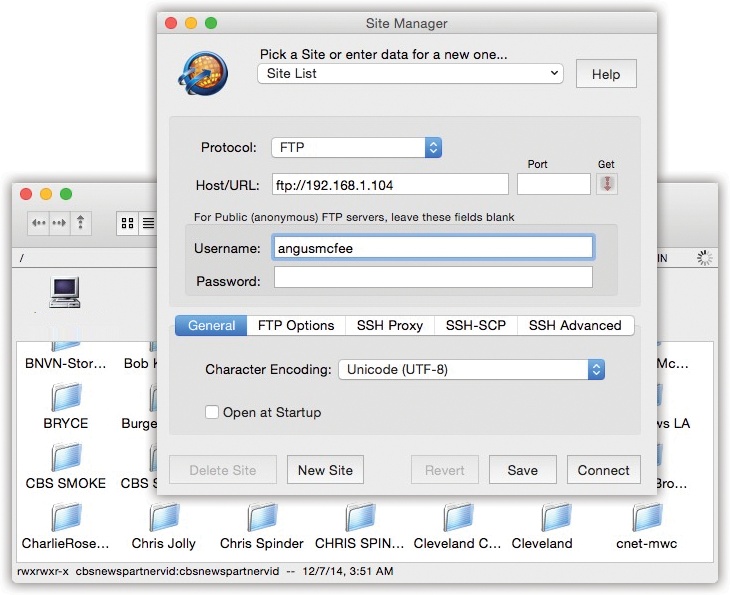
Figure 19-1. Top: To access your OS X machine from across the Internet, fire up a program like RBrowser and use the address ftp://111.222.33.4 (or whatever your public IP address is). Bottom: Once you’re looking at an FTP server’s contents, you can drag files from your desktop into the list, copy them to your Mac by dragging them out of the list onto your desktop, or ...
Read now
Unlock full access