July 2008
Intermediate to advanced
1026 pages
27h 59m
English
Quite often when you are writing code or debugging your application, you will want to evaluate a simple expression either to test a bit of functionality or to remind yourself of how something works. This is where the Immediate window comes in handy. This window enables you to run expressions as you type them. Figure 41-4 shows a number of statements — from basic assignment and print operations through to more advanced object creation and manipulation.
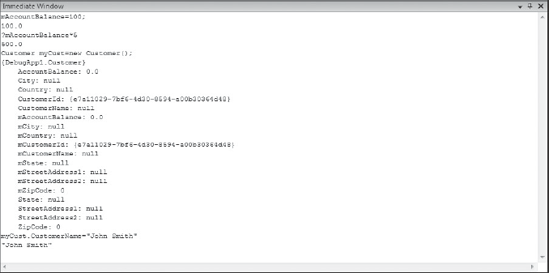
Figure 41-4 shows a new Customer object being created in a C# project within the Immediate window. Within a Visual Basic project you can't do explicit variable declaration (for example, Dim x as Integer). Instead it is done implicitly using the assignment operator.
One of the more useful features of the Immediate window is that it can be used while you are writing code. When you create new objects in the Immediate window at design time, it will create an instance of that object using the Object Test Bench. If you invoke a method or property that contains an active breakpoint, Visual Studio will change to debug mode and break at the breakpoint. This is particularly useful if you are working on a particular method that you want to test without running the entire application.
The Immediate window supports a limited form of IntelliSense, and you can use the arrow keys to track back through ...
Read now
Unlock full access


 O’Reilly covers everything we've got, with content to help us build a world-class technology community, upgrade the capabilities and competencies of our teams, and improve overall team performance as well as their engagement.I wanted to learn C and C++, but it didn't click for me until I picked up an O'Reilly book. When I went on the O’Reilly platform, I was astonished to find all the books there, plus live events and sandboxes so you could play around with the technology.I’ve been on the O’Reilly platform for more than eight years. I use a couple of learning platforms, but I'm on O'Reilly more than anybody else. When you're there, you start learning. I'm never disappointed.I'm always learning. So when I got on to O'Reilly, I was like a kid in a candy store. There are playlists. There are answers. There's on-demand training. It's worth its weight in gold, in terms of what it allows me to do.