July 2008
Intermediate to advanced
1026 pages
27h 59m
English
Visual Studio 2008 sets up a number of default options for your experience with IntelliSense, but you can change many of these in the Options dialog if they don't suit your own way of doing things. Some of these items are specific to individual languages.
The first options to look at are found in the Environment section under the Keyboard group. Every command available in Visual Studio has a specific entry in the keyboard mapping list (see the Options dialog shown in Figure 16-11, accessible via Tools  Options).
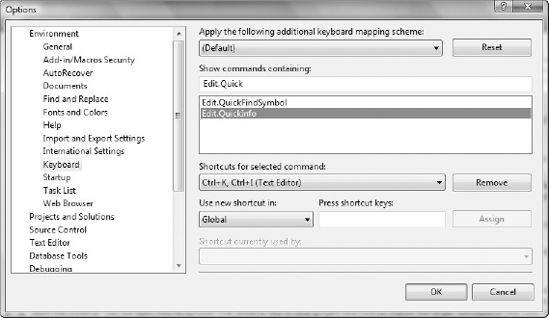
You can overwrite the predefined keyboard shortcuts, or add additional ones. The commands for the IntelliSense commands are as follows:
| Command Name | Default Shortcut | Command Description |
|---|---|---|
| Edit.QuickInfo | Ctrl+K, Ctrl+I | Displays the Quick Info information about the currently selected item |
| Edit.CompleteWord | Ctrl+Space | Attempts to complete a word if there is a single match, or displays a list to choose from if multiple terms match |
| Edit.ParameterInfo | Ctrl+Shift+Space | Displays the information about the parameter list in a function call |
| Edit.InsertSnippet | Ctrl+K, Ctrl+X | Invokes the Code Snippet dialog, from which you can select a code snippet to insert code automatically |
| Edit.GenerateMethodStub ... |
Read now
Unlock full access


 O’Reilly covers everything we've got, with content to help us build a world-class technology community, upgrade the capabilities and competencies of our teams, and improve overall team performance as well as their engagement.I wanted to learn C and C++, but it didn't click for me until I picked up an O'Reilly book. When I went on the O’Reilly platform, I was astonished to find all the books there, plus live events and sandboxes so you could play around with the technology.I’ve been on the O’Reilly platform for more than eight years. I use a couple of learning platforms, but I'm on O'Reilly more than anybody else. When you're there, you start learning. I'm never disappointed.I'm always learning. So when I got on to O'Reilly, I was like a kid in a candy store. There are playlists. There are answers. There's on-demand training. It's worth its weight in gold, in terms of what it allows me to do.