September 2009
Intermediate to advanced
472 pages
16h 45m
English
Distributing selected objects means moving them so that the intervals between them, when measured in a certain way, become equal. The same Align and Distribute dialog has eight object distribution buttons and two text distribution buttons, differing in how they measure these intervals. As with alignment buttons, half of these buttons (the top row) work horizontally and the other half (the bottom row) work vertically:
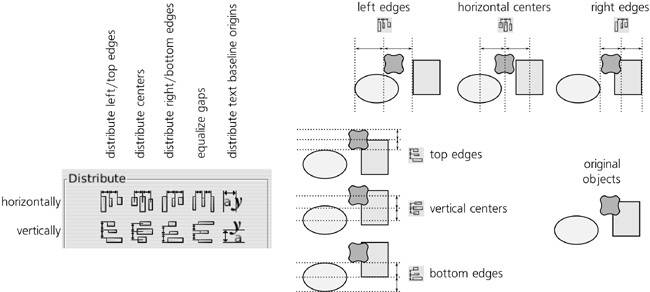
Figure 7-15. Distributing objects
Exactly under the centering buttons in the Align section, the Distribute section has the two buttons for distributing centers. By pressing one of these buttons, you move selected objects ...
Read now
Unlock full access


 O’Reilly covers everything we've got, with content to help us build a world-class technology community, upgrade the capabilities and competencies of our teams, and improve overall team performance as well as their engagement.I wanted to learn C and C++, but it didn't click for me until I picked up an O'Reilly book. When I went on the O’Reilly platform, I was astonished to find all the books there, plus live events and sandboxes so you could play around with the technology.I’ve been on the O’Reilly platform for more than eight years. I use a couple of learning platforms, but I'm on O'Reilly more than anybody else. When you're there, you start learning. I'm never disappointed.I'm always learning. So when I got on to O'Reilly, I was like a kid in a candy store. There are playlists. There are answers. There's on-demand training. It's worth its weight in gold, in terms of what it allows me to do.