October 2009
Beginner
208 pages
4h 41m
English
On the security front, Microsoft has made some UI tweaks to IE to encourage users to be more conscious of the sites they are visiting while at the same time adding new filters to help detect malicious websites.
In IE8, the domain name in the URL is highlighted to draw your attention to the site you are visiting. As shown in Figure 6-24, it is apparent that the URL of the site is oreillynet.com, as it is highlighted in black while the rest of the URL is in gray.
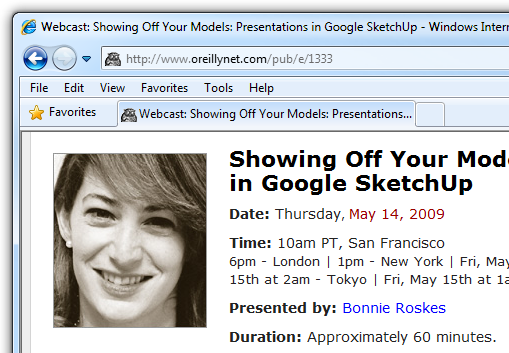
Figure 6-24. Highlighting the domain name in the address bar
In IE7, Microsoft introduced the Phishing Filter, via which IE will try to warn users when they attempt to visit known phishing sites. In IE8, Microsoft has replaced the Phishing Filter with a feature called the SmartScreen Filter, which is still essentially a phishing filter, but with some advancement:
Improved user interface
Better performance
Antimalware support
When a phishing site is detected, IE8 will display the warning page shown in Figure Figure 6-25.
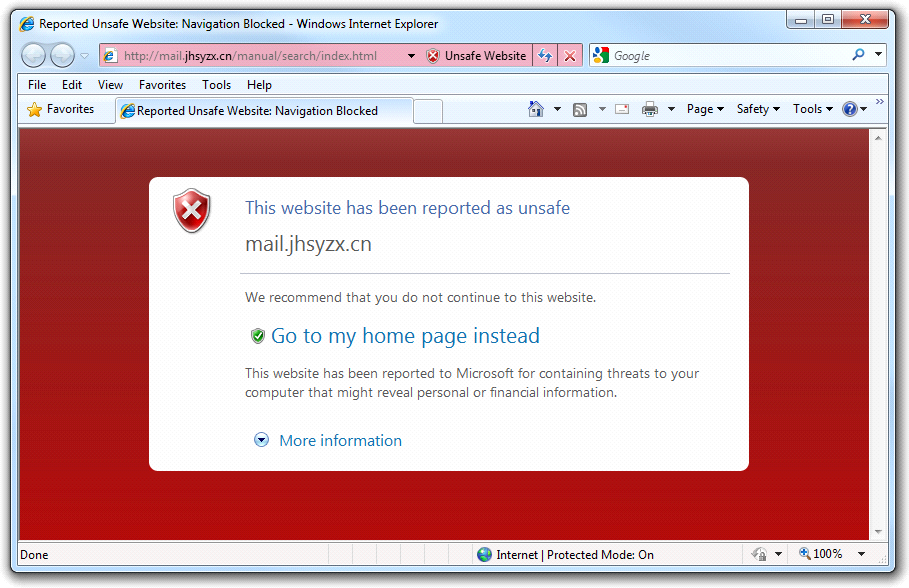
Figure 6-25. IE8 detecting a phishing site
You can also manually check whether a site contains threats by clicking the Safety button and then selecting SmartScreen Filter→Check This Website (see Figure 6-26). IE8 will check the URL against the list of suspected sites from its ...
Read now
Unlock full access


 O’Reilly covers everything we've got, with content to help us build a world-class technology community, upgrade the capabilities and competencies of our teams, and improve overall team performance as well as their engagement.I wanted to learn C and C++, but it didn't click for me until I picked up an O'Reilly book. When I went on the O’Reilly platform, I was astonished to find all the books there, plus live events and sandboxes so you could play around with the technology.I’ve been on the O’Reilly platform for more than eight years. I use a couple of learning platforms, but I'm on O'Reilly more than anybody else. When you're there, you start learning. I'm never disappointed.I'm always learning. So when I got on to O'Reilly, I was like a kid in a candy store. There are playlists. There are answers. There's on-demand training. It's worth its weight in gold, in terms of what it allows me to do.