October 2009
Beginner
208 pages
4h 41m
English
Windows 7 ships with some really neat utilities to help you work with external accessories as well as troubleshoot problems. Here are some of the cool ones.
If you have ever done presentations using your notebook computer, you know the kind of nightmare you sometimes have to go through to get your display projected correctly on the projector screen—find the right key combinations on your keyboard, toggle a couple of times, and so on. If you want to use the projector screen as an extension of your screen, you need to go to the screen settings and mess with the setup again.
In Windows 7, you can now quickly control the display projection by pressing the Windows-P key combination. You will see the pop up shown in Figure 8-22.
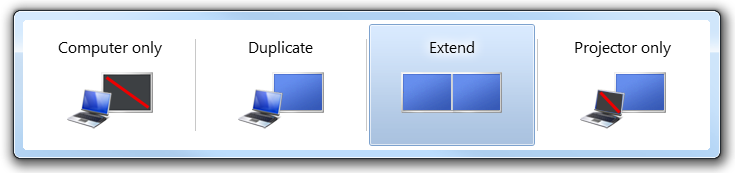
Figure 8-22. Controlling the display output options
As you can see, you can easily control how the display is shown on your computer and the projector simply by selecting the option that applies to you.
You can also use the command
displayswitch.exe to invoke the projector pop up. You can run it from the
command prompt or the search field of the Start menu.
One very cool tool shipped in Windows 7 is the Problems Steps Recorder application. This is one of the internal tools that Microsoft uses for feedback, now available in Windows 7. The Problems Steps Recorder application basically captures ...
Read now
Unlock full access


 O’Reilly covers everything we've got, with content to help us build a world-class technology community, upgrade the capabilities and competencies of our teams, and improve overall team performance as well as their engagement.I wanted to learn C and C++, but it didn't click for me until I picked up an O'Reilly book. When I went on the O’Reilly platform, I was astonished to find all the books there, plus live events and sandboxes so you could play around with the technology.I’ve been on the O’Reilly platform for more than eight years. I use a couple of learning platforms, but I'm on O'Reilly more than anybody else. When you're there, you start learning. I'm never disappointed.I'm always learning. So when I got on to O'Reilly, I was like a kid in a candy store. There are playlists. There are answers. There's on-demand training. It's worth its weight in gold, in terms of what it allows me to do.