December 2004
Beginner
256 pages
10h 49m
English
Sooner or later, most worksheets get printed—providing tangible evidence of your hard work, as well as the real location of the paperless office (just down the block from Shangri-La). So it’s important that the printed output do your efforts justice. If you spend hours or even days entering data and building elaborate workbooks, you should be able to print out that data without hassles. In this chapter, I’ll look at the one class of annoyances that dogs all Excel users: controlling what prints. It might be multiple workbooks, a single worksheet, or even a small selection (as tiny as one cell). Then we’ll move on to annoyances you bang into when you request a special layout or try to control where content appears on a skein of printed pages. Along the way, you’ll discover how to control gridlines, page numbers, report titles, and so on. Finally, you’ll learn how to pick a printer, dictate output quality, check the status of a print job, and more.
My worksheet prints with lots of its columns or rows scattered onto a second page. This makes it hard to read the worksheet (see a print preview in Figure 7-1), and it wastes paper—I really need it to fit onto a single sheet. How can I manage that?
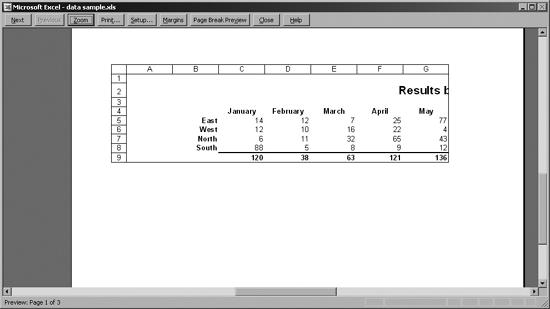
Figure 7-1. Without intervention, critical information will be shunted onto an unwanted ...
Read now
Unlock full access


 O’Reilly covers everything we've got, with content to help us build a world-class technology community, upgrade the capabilities and competencies of our teams, and improve overall team performance as well as their engagement.I wanted to learn C and C++, but it didn't click for me until I picked up an O'Reilly book. When I went on the O’Reilly platform, I was astonished to find all the books there, plus live events and sandboxes so you could play around with the technology.I’ve been on the O’Reilly platform for more than eight years. I use a couple of learning platforms, but I'm on O'Reilly more than anybody else. When you're there, you start learning. I'm never disappointed.I'm always learning. So when I got on to O'Reilly, I was like a kid in a candy store. There are playlists. There are answers. There's on-demand training. It's worth its weight in gold, in terms of what it allows me to do.