September 1998
Intermediate to advanced
1258 pages
42h 57m
English
Certain GUI applications need to simulate a desktop environment by allowing multiple “frames” to be displayed within a single root window. These frames look like the normal frames you’d see on a real desktop, but are not actually known to the window manager, because they are not really windows in the normal sense of the term. For some types of applications (word processors, IDEs, etc.), this can be a very powerful approach to UI design.
In this chapter, we’ll look at a collection of classes Swing provides to allow you to create this type of application in Java. At the end of the chapter, we’ll provide a large sample program that shows how to implement a variety of useful features.
Before looking at each of the classes involved in the Swing desktop/internal frame model, we’ll take a moment for an overview of how they all work together. Figure 9.1 shows the relationships between the classes we’ll be covering in this chapter.
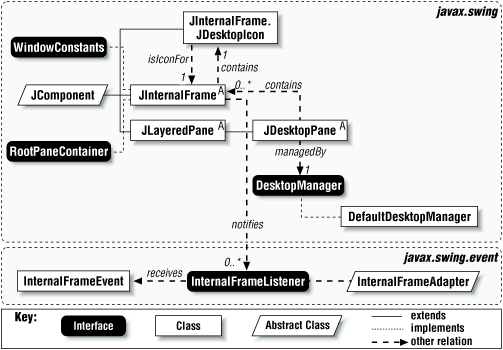
Figure 9-1. Internal Frame and Desktop class diagram
A
JInternalFrame is a
container that looks much like a JFrame. The key
difference is that internal frames can only exist within some other
Java container. JInternalFrame implements the
following three interfaces: Accessible,
WindowConstants,
RootPaneContainer.
Each internal frame keeps a reference to an instance of the static
inner class called JDesktopIcon ...
Read now
Unlock full access


 O’Reilly covers everything we've got, with content to help us build a world-class technology community, upgrade the capabilities and competencies of our teams, and improve overall team performance as well as their engagement.I wanted to learn C and C++, but it didn't click for me until I picked up an O'Reilly book. When I went on the O’Reilly platform, I was astonished to find all the books there, plus live events and sandboxes so you could play around with the technology.I’ve been on the O’Reilly platform for more than eight years. I use a couple of learning platforms, but I'm on O'Reilly more than anybody else. When you're there, you start learning. I'm never disappointed.I'm always learning. So when I got on to O'Reilly, I was like a kid in a candy store. There are playlists. There are answers. There's on-demand training. It's worth its weight in gold, in terms of what it allows me to do.