December 2014
Beginner
874 pages
30h 11m
English
You can now send and receive text messages (and picture, audio, and video messages) on your Mac, too.
We’re not talking about sending texts to other Apple people (with iCloud accounts). Those are called iMessages, and they’re a special, Apple-only kind of message. We’re talking about something much better: You can type any cellphone number and send a regular SMS text message to anyone. Or receive them when they’re sent to your iPhone number.
Or you can initiate the text conversation by clicking a phone number in Contacts, Calendar, or Safari to send an SMS message. Once again, your iPhone acts as a relay station between the cellular world and your Mac.
Here’s how to set it up.
First, the Mac and the phone must be on the same WiFi network and signed into the same iCloud account.
Next, on the iPhone, open Settings→Messages. Tap Text Message Forwarding. Your Mac’s name appears. Turn on the switch.
Now, on the Mac, open Messages. (If all is going well, its icon is probably popping out of your Dock at this moment, trying to get your attention.) When you open Messages, a code appears. You’re supposed to type into the corresponding box on your phone (Figure 7-3).
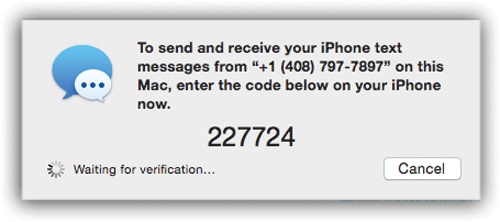
Figure 7-3. The purpose of having to enter this setup code is to prove, really and truly, that you’re the owner of both devices. You wouldn’t want some bad guy reading your text messages, would you?
This same code appears ...
Read now
Unlock full access


 O’Reilly covers everything we've got, with content to help us build a world-class technology community, upgrade the capabilities and competencies of our teams, and improve overall team performance as well as their engagement.I wanted to learn C and C++, but it didn't click for me until I picked up an O'Reilly book. When I went on the O’Reilly platform, I was astonished to find all the books there, plus live events and sandboxes so you could play around with the technology.I’ve been on the O’Reilly platform for more than eight years. I use a couple of learning platforms, but I'm on O'Reilly more than anybody else. When you're there, you start learning. I'm never disappointed.I'm always learning. So when I got on to O'Reilly, I was like a kid in a candy store. There are playlists. There are answers. There's on-demand training. It's worth its weight in gold, in terms of what it allows me to do.