October 2004
Intermediate to advanced
352 pages
13h 46m
English
Motion menus can feel restrictive when you get to the point where you're creating the buttons that show up on the screen. Highlighting rectangles on the screen just isn't as fancy as you might want to get. The Apple-supplied shapes help, but even those can be a bit repetitive. Although you are restricted to using overlays when you have a motion menu, you can make some pretty creative custom overlays.
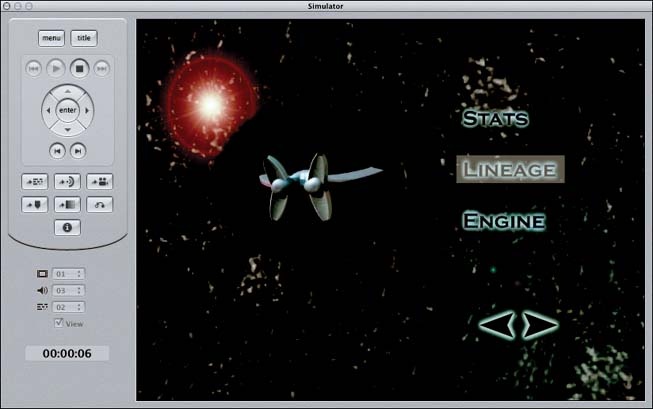
Figure 4-34. Our full-motion video in Preview mode
At its heart, an overlay is just a Photoshop layer that tells DVDSP what to draw when you select the rectangle that defines a button. The default overlay is a solid layer, so the highlighted rectangle shows up as just that: a rectangle. But you can make fancier overlays.
If you want a shape other than a rectangle to show up, you can create a Photoshop document to aid in this endeavor. Start with the standard NTSC-DV size document. Make the background completely white (or transparent). Now draw shapes in black wherever you want a custom-shaped button to appear. We often start with a still image of the video we'll be overlaying as the background. Then we make the overlay layer partially transparent so that we can see where to draw our shapes. Check out Figure 4-35 for an example of creating skiff-shaped buttons.
Figure 4-35. A 1-bit button mask (left), and the same mask laid over our menu image (right, ...
Read now
Unlock full access


 O’Reilly covers everything we've got, with content to help us build a world-class technology community, upgrade the capabilities and competencies of our teams, and improve overall team performance as well as their engagement.I wanted to learn C and C++, but it didn't click for me until I picked up an O'Reilly book. When I went on the O’Reilly platform, I was astonished to find all the books there, plus live events and sandboxes so you could play around with the technology.I’ve been on the O’Reilly platform for more than eight years. I use a couple of learning platforms, but I'm on O'Reilly more than anybody else. When you're there, you start learning. I'm never disappointed.I'm always learning. So when I got on to O'Reilly, I was like a kid in a candy store. There are playlists. There are answers. There's on-demand training. It's worth its weight in gold, in terms of what it allows me to do.