October 2011
Intermediate to advanced
928 pages
34h 56m
English
Once Safari opens, you’re ready for your first full-screen experience.
Click the  icon in the upper-right corner of the
Safari window.
icon in the upper-right corner of the
Safari window.
With a smooth animation, your Mac hides the menu bar and the bookmarks bar. The only thing remaining is the address bar. The window’s edges expand all the way to the edges of the screen (Figure 0-2).
You may as well learn the keyboard shortcut for the Enter Full Screen mode: Control-⌘-F. The same keystroke leaves Full Screen mode, but you can also tap the Esc key for that purpose.
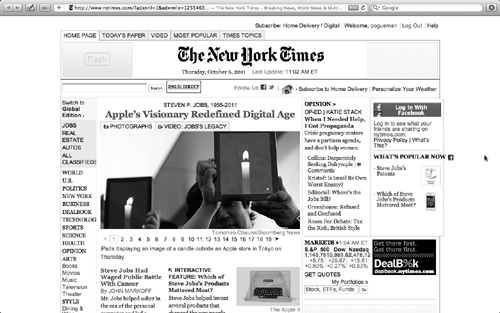
Figure 0-2. This, ladies and gentlemen, is Full Screen mode, one of the flagship features of Lion. The idea is to fight back against the forces of window clutter that have been encroaching on your document windows for years now. Your actual work, your photo or Web page, fills every pixel of that giant screen you paid so much money for.
You don’t have to panic, though. The menu bar is still available: Move the pointer to the top of the screen to make the menus reappear.
For the next demonstration, call up an actual Web page, preferably one with a lot of text on it—www.nytimes.com, for example. Now suppose you want to scroll down the page.
With two fingers on the trackpad, drag upward.
If you have a Magic Mouse, drag up with one finger.
If you just tried this, ...
Read now
Unlock full access


 O’Reilly covers everything we've got, with content to help us build a world-class technology community, upgrade the capabilities and competencies of our teams, and improve overall team performance as well as their engagement.I wanted to learn C and C++, but it didn't click for me until I picked up an O'Reilly book. When I went on the O’Reilly platform, I was astonished to find all the books there, plus live events and sandboxes so you could play around with the technology.I’ve been on the O’Reilly platform for more than eight years. I use a couple of learning platforms, but I'm on O'Reilly more than anybody else. When you're there, you start learning. I'm never disappointed.I'm always learning. So when I got on to O'Reilly, I was like a kid in a candy store. There are playlists. There are answers. There's on-demand training. It's worth its weight in gold, in terms of what it allows me to do.