October 2011
Intermediate to advanced
928 pages
34h 56m
English
After you’ve used Terminal awhile, you may feel ready for a few of these power tips:
If you choose Window→Split Pane (⌘-D), you wind up splitting your Terminal window into an upper pane and a lower pane. That can be handy when you keep certain scripts running all the time. The two panes mirror the same command, but now you can scroll to different positions within each pane, keeping watch over different parts of the same output simultaneously.
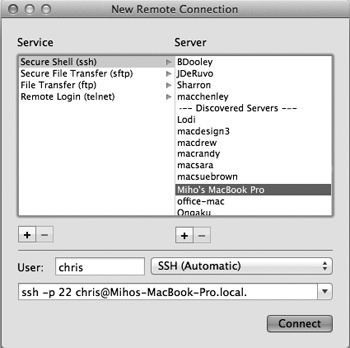
Figure 16-9. From the left side, choose the service you want; from the right, choose from a list of machines whose Remote Login checkboxes are turned on in the Sharing panel of System Preferences. Type your account name into the User box. As you adjust the connection options, the box at the bottom shows the Unix command you’re building. Click Connect to open a new Terminal window and send that command inside it.
You can switch among your various Terminal windows by pressing ⌘-1, ⌘-2, and so on (up to ⌘-9). You’ll be able to identify the windows easily if you choose to include the Command key in the title bars. (Use the Window section of the Settings Preference pane.)
You can select blobs of text, just as in Microsoft Word or TextEdit. To select a single rectangle of text anywhere in the window, Option-drag through it. To select multiple rectangles, Option-⌘-drag. You can ...
Read now
Unlock full access


 O’Reilly covers everything we've got, with content to help us build a world-class technology community, upgrade the capabilities and competencies of our teams, and improve overall team performance as well as their engagement.I wanted to learn C and C++, but it didn't click for me until I picked up an O'Reilly book. When I went on the O’Reilly platform, I was astonished to find all the books there, plus live events and sandboxes so you could play around with the technology.I’ve been on the O’Reilly platform for more than eight years. I use a couple of learning platforms, but I'm on O'Reilly more than anybody else. When you're there, you start learning. I'm never disappointed.I'm always learning. So when I got on to O'Reilly, I was like a kid in a candy store. There are playlists. There are answers. There's on-demand training. It's worth its weight in gold, in terms of what it allows me to do.