January 2000
Intermediate to advanced
672 pages
21h 46m
English
There is no real need to talk to modems these days, because Windows provides a standard set of dialogs and APIs for making and breaking dial-up connections. These are collectively known as Remote Access Services, or RAS for short. Users can create and save connections that specify many things, including the number to dial, usernames and passwords, and network protocols and settings.
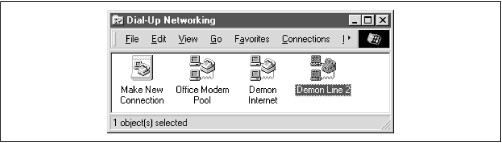
The dialogues vary considerably between Windows 95, 98, and NT, but the principles under the hood are the same. Windows thinks in terms of a phonebook. NT can have many phonebooks, stored in files with extension PBK; on Windows 95 and 98 there is a single default phonebook. The machine in Figure 19.1 has three entries.
 |
The win32ras
module supplied
with PythonWin provides a number of functions to manipulate these.
EnumEntries() returns a list of tuples with the
names of the entries in the phonebook:
>>> import win32ras
>>> win32ras.EnumEntries()   # what is in the phonebook?
[('Assi Modem Pool',), ('Demon',), ('Demon Private',)]
>>> win32ras.EnumConnections()  # show what's active now
[]
>>>
To make a connection, you need to specify a tuple of up to six
strings. This matches the RASDIALPARAMS structure
in Windows. The values are:
Entry name
Phone number
Callback number (used if you are dialing an NT server configured to call you right ...
Read now
Unlock full access


 O’Reilly covers everything we've got, with content to help us build a world-class technology community, upgrade the capabilities and competencies of our teams, and improve overall team performance as well as their engagement.I wanted to learn C and C++, but it didn't click for me until I picked up an O'Reilly book. When I went on the O’Reilly platform, I was astonished to find all the books there, plus live events and sandboxes so you could play around with the technology.I’ve been on the O’Reilly platform for more than eight years. I use a couple of learning platforms, but I'm on O'Reilly more than anybody else. When you're there, you start learning. I'm never disappointed.I'm always learning. So when I got on to O'Reilly, I was like a kid in a candy store. There are playlists. There are answers. There's on-demand training. It's worth its weight in gold, in terms of what it allows me to do.