April 2010
Beginner
464 pages
12h 7m
English
In the early years of Linux desktops, sections such as this one on setting up graphics tended to be much longer, showering the reader with potential problems to solve and pitfalls to avoid. But over the years, more and more work has gone into making the Linux graphics drivers as bulletproof as possible.
For a long time, a Linux installation might not have been able to call up a graphical desktop at all without strenuous configuration work. Nowadays you are almost certain to be able to open up a desktop of 800 × 600 (or at the very least, 640 × 480) pixels. This is because a lot of effort has been put into developing a very robust set of basic drivers.
However, that doesn’t mean that your new high-resolution widescreen monitor is guaranteed to display its top resolution mode straight “out of the box,” and less standard graphics cards and monitors may also have difficulties displaying some graphic resolutions. So some hints and tips follow to help you achieve the best possible results from your graphics card and monitor.
You can call up the Display Preferences window by selecting System → Preferences → Display, which will present a window similar to that shown in Figure 3-16.
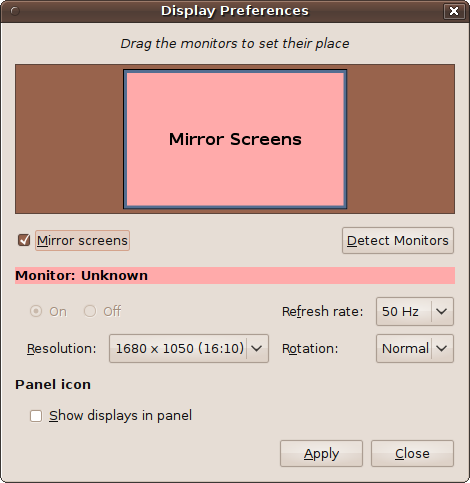
Figure 3-16. The Display Preferences window, showing a resolution of 1680 × 1050 pixels
There are a number of options available in this window, but the most important to you at this moment ...
Read now
Unlock full access


 O’Reilly covers everything we've got, with content to help us build a world-class technology community, upgrade the capabilities and competencies of our teams, and improve overall team performance as well as their engagement.I wanted to learn C and C++, but it didn't click for me until I picked up an O'Reilly book. When I went on the O’Reilly platform, I was astonished to find all the books there, plus live events and sandboxes so you could play around with the technology.I’ve been on the O’Reilly platform for more than eight years. I use a couple of learning platforms, but I'm on O'Reilly more than anybody else. When you're there, you start learning. I'm never disappointed.I'm always learning. So when I got on to O'Reilly, I was like a kid in a candy store. There are playlists. There are answers. There's on-demand training. It's worth its weight in gold, in terms of what it allows me to do.