August 2007
Intermediate to advanced
608 pages
20h 33m
English
In the 1.4.0 version of Asterisk and its related packages, a new build system, autoconf, was implemented. This has changed the build process slightly, but has given more flexibilty to control what modules are being built at build time. This has an advantage in that we only have to build the modules we want and need instead of building everything.
Along with the new build system, a new menu-based selection system
was introduced, courtesy of Russell Bryant. This new system permits a
finer-grained selection to which modules are built before compiling the
software and no longer requires the user to edit
Makefiles. So instead of discussing how to use menuselect in every
“Compiling ...” section, we will discuss it here, so when you see
make menuselect you will understand
what to do once inside the menuselect configuration screen.
In Figure 3-1, we see the opening menuselect screen for the Asterisk software. Other packages will look extremely similar, but with less options. We can navigate up and down the list using the arrow keys. We can select one of the menu options by pressing Enter or by using the right arrow key. The left arrow key can be used to go back.
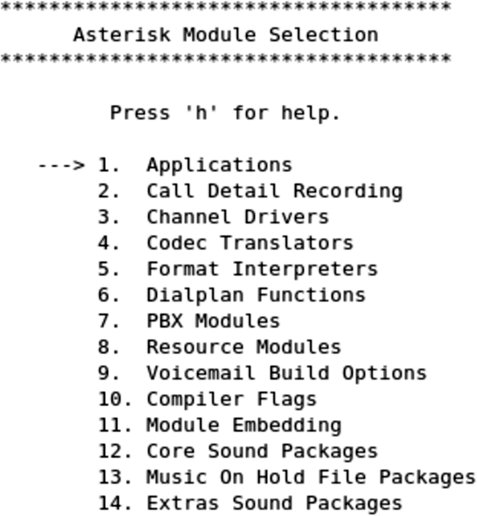
Figure 3-1. Sample menuselect screen
Figure 3-2 shows a list of possible
dialplan applications that can be built for use in Asterisk. Modules to
be built are marked as [*]. A module
is marked as not being built by [ ]. Modules ...
Read now
Unlock full access


 O’Reilly covers everything we've got, with content to help us build a world-class technology community, upgrade the capabilities and competencies of our teams, and improve overall team performance as well as their engagement.I wanted to learn C and C++, but it didn't click for me until I picked up an O'Reilly book. When I went on the O’Reilly platform, I was astonished to find all the books there, plus live events and sandboxes so you could play around with the technology.I’ve been on the O’Reilly platform for more than eight years. I use a couple of learning platforms, but I'm on O'Reilly more than anybody else. When you're there, you start learning. I'm never disappointed.I'm always learning. So when I got on to O'Reilly, I was like a kid in a candy store. There are playlists. There are answers. There's on-demand training. It's worth its weight in gold, in terms of what it allows me to do.