January 2013
Beginner
416 pages
11h 53m
English
Certain lenses can produce a type of distortion that causes straight lines to appear curved. Wide-angle lenses, for example, often create barrel distortion, in which objects at the center of a picture appear to be magnified and pushed forward — as if you wrapped the photo around the outside of a barrel. The effect is perhaps easiest to spot in a rectangular subject like the oil painting in Figure 11-13. Notice that in the original image, on the left, the edges of the painting appear to bow slightly outward. Pincushion distortion affects the photo in the opposite way, making center objects appear smaller and farther away.
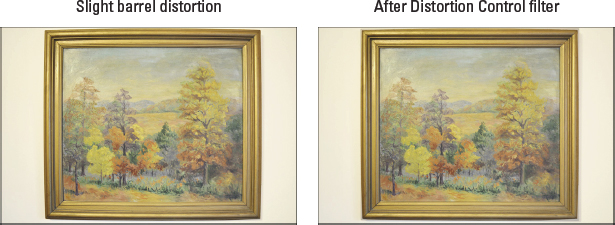
Figure 11-13: Barrel distortion makes straight lines appear to bow outward.
If you routinely notice that your lens produces this type of distortion, try enabling the Auto Distortion Control option on the Shooting menu. This feature, explained fully in Chapter 2, attempts to correct distortion as you take the picture. Or you may prefer to wait until after reviewing your photos and then use the Distortion Control tool on the Retouch menu to try to fix things. I applied the filter to create the second version of the subject in Figure 11-13, for example. Less helpful, in my opinion, is a related filter, the Fisheye filter, that actually creates distortion in an attempt to replicate the look of a photo taken with a fisheye lens. ...
Read now
Unlock full access


 O’Reilly covers everything we've got, with content to help us build a world-class technology community, upgrade the capabilities and competencies of our teams, and improve overall team performance as well as their engagement.I wanted to learn C and C++, but it didn't click for me until I picked up an O'Reilly book. When I went on the O’Reilly platform, I was astonished to find all the books there, plus live events and sandboxes so you could play around with the technology.I’ve been on the O’Reilly platform for more than eight years. I use a couple of learning platforms, but I'm on O'Reilly more than anybody else. When you're there, you start learning. I'm never disappointed.I'm always learning. So when I got on to O'Reilly, I was like a kid in a candy store. There are playlists. There are answers. There's on-demand training. It's worth its weight in gold, in terms of what it allows me to do.