December 2011
Beginner to intermediate
120 pages
2h 32m
English
The Daily Shelf is useful because it puts an always-changing selection of books, magazines, newspapers, and apps within easy reach. But that selection isn’t permanent; it changes as you use your NOOK.
You may, though want to have some items always within easy reach—for example, the books and magazines you’re currently reading, Netflix so that you can quickly jump to watching your favorite movies, and so on.
It’s easy to do. You can move items onto and off your Home Screen, anchor them at different locations on your Home Screen, and if things get too messy arrange them in a neat grid.
As explained in the previous section, to move an item from the Home Screen to the Daily Shelf, just drag it to the location where you want it to be. If you’d like, you can even stack books on top of one another, by dragging one book over the other. Just make sure that you don’t completely obscure a cover of a book by any covers you’ve placed above it.
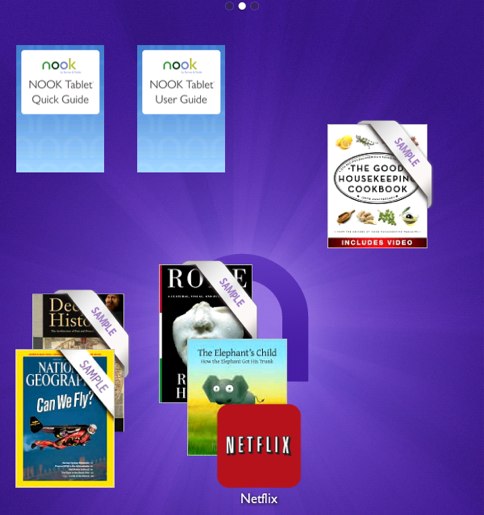
Figure 3-17. A customized Home screen
And it’s not just books you can stack on top of one another. You can do it with any item, including magazines, newspapers, and apps.
If you’re the neat sort, you can even arrange all of the items onto it into a neat grid. To do it, just double-tap any open area of the Home Screen and they automatically rearrange themselves. Any stacked items are unstacked and placed on a grid.
If you prefer, press ...
Read now
Unlock full access


 O’Reilly covers everything we've got, with content to help us build a world-class technology community, upgrade the capabilities and competencies of our teams, and improve overall team performance as well as their engagement.I wanted to learn C and C++, but it didn't click for me until I picked up an O'Reilly book. When I went on the O’Reilly platform, I was astonished to find all the books there, plus live events and sandboxes so you could play around with the technology.I’ve been on the O’Reilly platform for more than eight years. I use a couple of learning platforms, but I'm on O'Reilly more than anybody else. When you're there, you start learning. I'm never disappointed.I'm always learning. So when I got on to O'Reilly, I was like a kid in a candy store. There are playlists. There are answers. There's on-demand training. It's worth its weight in gold, in terms of what it allows me to do.