July 2005
Intermediate to advanced
866 pages
29h 18m
English
It's a good thing you've got a book about Mac OS X in your hands, because you won't get much help from Apple. The only user manual you get with Mac OS X is the Help → Mac Help command, which you can also summon by pressing ⌘-?. You get a Web browser–like program that reads a set of help files that reside in your System → Library folder.
You're expected to find the topic you want in one of these two ways:
Drill down. The starting screen offers several "quick click" topics that may interest you (Figure 1-24). If so, keep clicking text headings until you find a topic that you want to read.
You can backtrack by clicking the Back (left-pointing arrow) button at the top of the browser window.
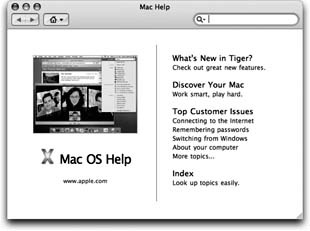
Figure 1-24. The Mac OS X Help system no longer bunches together the help pages from every program on your Mac, as it did in previous versions. When you're in the Finder, you get the general Macintosh help screens. When you're in iPhoto, you get only iPhoto help screens. And so on. But using the Home pop-up menu, you can switch to another program's Help system even if that program isn't open.
Use the "Ask a Question" blank. Type the phrase you want, such as printing or switching applications, into the blank at the top of the window, and then press Return.
The Mac responds by showing you a list of help-screen topics that may pertain to what you need; see Figure 1-25 for details.
Read now
Unlock full access


 O’Reilly covers everything we've got, with content to help us build a world-class technology community, upgrade the capabilities and competencies of our teams, and improve overall team performance as well as their engagement.I wanted to learn C and C++, but it didn't click for me until I picked up an O'Reilly book. When I went on the O’Reilly platform, I was astonished to find all the books there, plus live events and sandboxes so you could play around with the technology.I’ve been on the O’Reilly platform for more than eight years. I use a couple of learning platforms, but I'm on O'Reilly more than anybody else. When you're there, you start learning. I'm never disappointed.I'm always learning. So when I got on to O'Reilly, I was like a kid in a candy store. There are playlists. There are answers. There's on-demand training. It's worth its weight in gold, in terms of what it allows me to do.