July 2005
Intermediate to advanced
866 pages
29h 18m
English
How did anyone ever find anything before Spotlight? By relying one of these two techniques:
Using ⌘-F. That's the keystroke for the File → Find command, which, for years of Macintosh history, has opened up a Find dialog box.
Using the Search box. That's the round-ended text box at the top of every Finder window, which, until Tiger came along, could search only within that window. See the box below for details.
In Tiger, ⌘-F still opens up a Search dialog box, and there's still a Search bar at the top of every folder window. Both of these, though, are still more entry points for Spotlight.
The File → Find command (⌘-F) opens the Search window shown in Figure 3-7. It's a lot more powerful (and complex) than the basic Spotlight menu, because it can hunt down icons using extremely specific criteria. If you spent enough time setting up the search, you could use this feature to find a document whose name begins with the letters Cro, is over one megabyte in size, was created after 6/1/05 but before the end of the year, was changed within the last week, has the file name suffix .doc, and contains the phrase "attitude adjustment." (Of course, if you knew that much about a file, you'd probably know where it is without having to use the Search window. But you get the picture.)
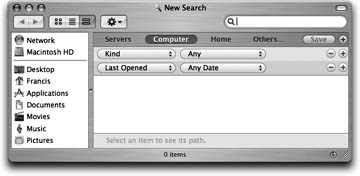
Figure 3-7. Unless you've first opened a folder or disk window, the new Search dialog box opens up ready ...
Read now
Unlock full access


 O’Reilly covers everything we've got, with content to help us build a world-class technology community, upgrade the capabilities and competencies of our teams, and improve overall team performance as well as their engagement.I wanted to learn C and C++, but it didn't click for me until I picked up an O'Reilly book. When I went on the O’Reilly platform, I was astonished to find all the books there, plus live events and sandboxes so you could play around with the technology.I’ve been on the O’Reilly platform for more than eight years. I use a couple of learning platforms, but I'm on O'Reilly more than anybody else. When you're there, you start learning. I'm never disappointed.I'm always learning. So when I got on to O'Reilly, I was like a kid in a candy store. There are playlists. There are answers. There's on-demand training. It's worth its weight in gold, in terms of what it allows me to do.