July 2005
Intermediate to advanced
866 pages
29h 18m
English
This panel shows up only if your Mac is equipped with a Bluetooth transmitter, either built-in or in the form of an external USB gadget. The thrill of using Bluetooth to send files is described in detail in Chapter 7, but here's a quick overview of this panel's three tabs:
Here's where you make your Mac discoverable (that is, "visible" to other Bluetooth gadgets). Here's also where you can tell the Bluetooth Setup Assistant to open up automatically when the Mac thinks no keyboard and mouse are attached (because it assumes that you have a wireless Bluetooth keyboard and mouse that has yet to be set up).
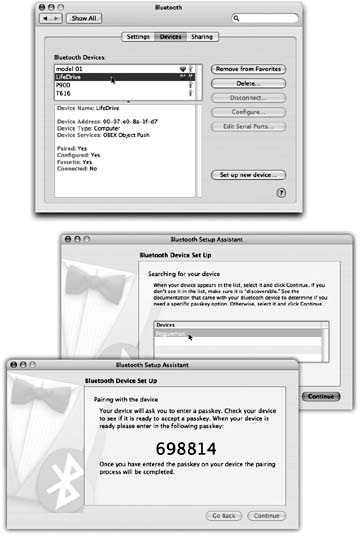
Figure 9-4. Top: This System Preferences panel reveals a list of every Bluetooth gadget your Mac knows about so far. Click a Bluetooth device to see, in the lower box, what sort of device it is (phone, computer or palmtop, etc.), and whether it's turned on and available. The ones with a heart symbol are what Apple calls Favorites—they're the ones that you've paired so that you don't have to re-enter a password every time you want to use this Bluetooth connection. Middle: The Bluetooth Setup Assistant scans the area for other Bluetooth gadgets, and, after a moment, lists them for you here. Click one and then continue. Bottom: Where security is an issue—like when you plan to use your Bluetooth cellphone as a wireless Internet antenna for your PowerBook, and you'd just ...
Read now
Unlock full access


 O’Reilly covers everything we've got, with content to help us build a world-class technology community, upgrade the capabilities and competencies of our teams, and improve overall team performance as well as their engagement.I wanted to learn C and C++, but it didn't click for me until I picked up an O'Reilly book. When I went on the O’Reilly platform, I was astonished to find all the books there, plus live events and sandboxes so you could play around with the technology.I’ve been on the O’Reilly platform for more than eight years. I use a couple of learning platforms, but I'm on O'Reilly more than anybody else. When you're there, you start learning. I'm never disappointed.I'm always learning. So when I got on to O'Reilly, I was like a kid in a candy store. There are playlists. There are answers. There's on-demand training. It's worth its weight in gold, in terms of what it allows me to do.