July 2005
Intermediate to advanced
866 pages
29h 18m
English
If you travel with a laptop, you know the drill. You're constantly opening up System Preferences→Network so that you can switch between Internet settings: Ethernet at the office, dial-up at home. Or maybe you simply visit the branch office from time to time, and you're getting tired of having to change the local access number for your ISP each time you leave home (and return home again).
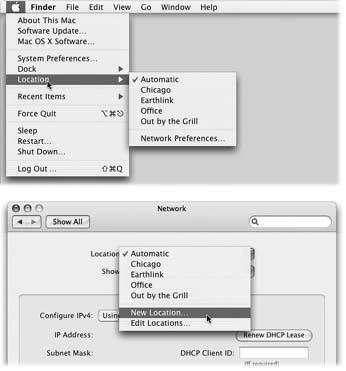
Figure 19-5. The Location feature lets you switch from one "location" to another just by choosing its name—either from the a menu (top) or from this pop-up menu in System Preferences (bottom). The Automatic location just means "the standard, default one you originally set up." (Don't be fooled: Despite its name, Automatic isn't the only location that offers multihoming, which is described later in this chapter.)
The simple solution is the a→Location submenu. As Figure 19-5 illustrates, all you have to do is tell it where you are. Mac OS X handles the details of switching to the correct Internet connection and phone number.
To create a Location, which is nothing more than a set of memorized settings, open System Preferences, click Network, and choose New Location from the Location pop-up menu. You'll be asked to provide a name for your new location, such as Chicago Office or Dining Room Floor.
When you click OK, you return to the Network panel, which is now blank. ...
Read now
Unlock full access


 O’Reilly covers everything we've got, with content to help us build a world-class technology community, upgrade the capabilities and competencies of our teams, and improve overall team performance as well as their engagement.I wanted to learn C and C++, but it didn't click for me until I picked up an O'Reilly book. When I went on the O’Reilly platform, I was astonished to find all the books there, plus live events and sandboxes so you could play around with the technology.I’ve been on the O’Reilly platform for more than eight years. I use a couple of learning platforms, but I'm on O'Reilly more than anybody else. When you're there, you start learning. I'm never disappointed.I'm always learning. So when I got on to O'Reilly, I was like a kid in a candy store. There are playlists. There are answers. There's on-demand training. It's worth its weight in gold, in terms of what it allows me to do.