July 2005
Intermediate to advanced
866 pages
29h 18m
English
Only one program can be in front, or active, at a time.
To make a different program active, you could simply repeat the technique you used to launch the program initially. Click its Dock icon, double-click a document icon, or whatever.
You can also switch to a different program by clicking its icon in the Dock. Doing so makes the program, along with any of its open windows and toolbars, pop to the front.
But there's a faster, more direct program-switching feature—faster, because you perform it entirely from the keyboard. Just hold down the ⌘ key and begin tapping the Tab key (Figure 5-3).
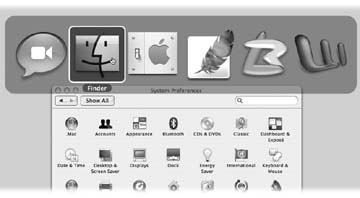
Figure 5-3. Apple calls this Windows-like row of open program icons a "heads-up display," partly because it's translucent (like the projected "heads-up display" data screens on a Navy jet windshield) and partly because you don't have to look down to the Dock to see what you're doing. (Shown here superimposed on another window to illustrate its translucence.)
You can use this feature in three different ways, which are well worth learning:
If you keep the ⌘ key pressed, each press of the Tab key highlights the Dock icon of another program, in left-to-right Dock order. Release both keys when you reach the one you want. Mac OS X brings the corresponding program to the front. (To move backward through the open programs, press Shift-⌘-Tab.)
If you leave the ⌘ key pressed, you can ...
Read now
Unlock full access


 O’Reilly covers everything we've got, with content to help us build a world-class technology community, upgrade the capabilities and competencies of our teams, and improve overall team performance as well as their engagement.I wanted to learn C and C++, but it didn't click for me until I picked up an O'Reilly book. When I went on the O’Reilly platform, I was astonished to find all the books there, plus live events and sandboxes so you could play around with the technology.I’ve been on the O’Reilly platform for more than eight years. I use a couple of learning platforms, but I'm on O'Reilly more than anybody else. When you're there, you start learning. I'm never disappointed.I'm always learning. So when I got on to O'Reilly, I was like a kid in a candy store. There are playlists. There are answers. There's on-demand training. It's worth its weight in gold, in terms of what it allows me to do.