April 2009
Intermediate to advanced
888 pages
40h
English
Handy as it might be to have some prefab layouts for simple documents like letters and envelopes, Pages templates really shine in projects requiring more lavish layouts. The Newsletters category of page-layout templates, for example, offers a particularly rich collection of starter documents to create your own news bulletin.
Here’s an example newsletter project to tackle: Up & Away is Megaville’s leading outfitter for superheroes, providing essential gear (capes, utility belts, jet packs) and services (secret-identity counseling, sidekick placement, tights repair) to the city’s crime fighters. The shop’s quarterly newsletter features new items for sale as well as how-to articles and features about trends in the caped community. As editor, your superpower is newsletter design, and Pages is your secret weapon.
Launch Pages and, in the Template Chooser, click the Newsletters category under Page Layout; select your preferred template in the right pane. For this example, choose Extreme Newsletter; Pages fills your document window with a colorful full-page newsletter layout (Figure 1-8).
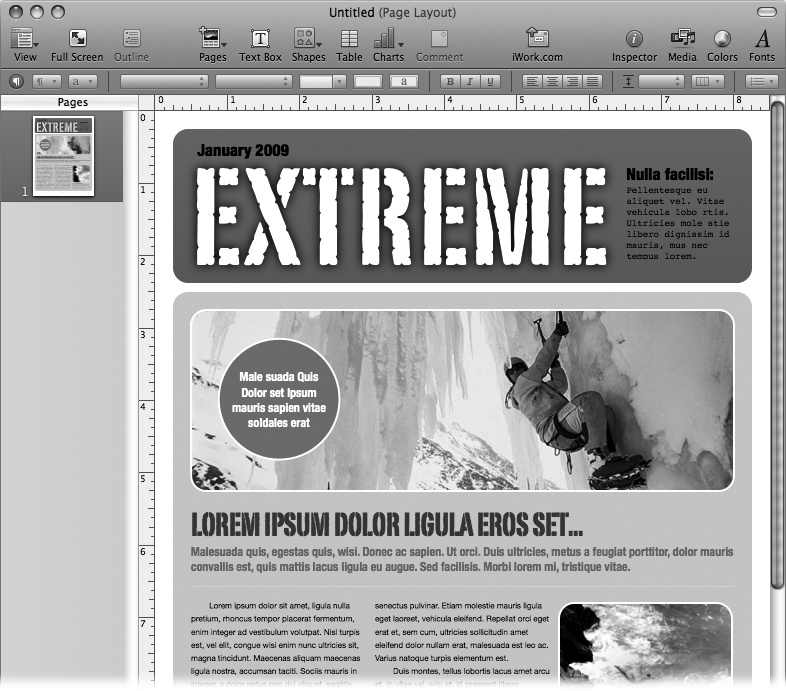
Figure 1-8. Page-layout documents feature lots of design elements, including text boxes, photos, and fields of color—quite a departure from traditional word-processing documents with a single primary text area.
As with the letter template you saw earlier, your new document includes ...
Read now
Unlock full access


 O’Reilly covers everything we've got, with content to help us build a world-class technology community, upgrade the capabilities and competencies of our teams, and improve overall team performance as well as their engagement.I wanted to learn C and C++, but it didn't click for me until I picked up an O'Reilly book. When I went on the O’Reilly platform, I was astonished to find all the books there, plus live events and sandboxes so you could play around with the technology.I’ve been on the O’Reilly platform for more than eight years. I use a couple of learning platforms, but I'm on O'Reilly more than anybody else. When you're there, you start learning. I'm never disappointed.I'm always learning. So when I got on to O'Reilly, I was like a kid in a candy store. There are playlists. There are answers. There's on-demand training. It's worth its weight in gold, in terms of what it allows me to do.