January 2005
Intermediate to advanced
688 pages
25h 59m
English
Internet Explorer —
\program files\internet explorer\iexplore.exe
A web browser used to view web content.
Start → Programs → Internet Explorer
Use the Internet Explorer icon on the Desktop or on the QuickLaunch Toolbar
Command Prompt →
iexplore
iexplore [-nohome] [url]
Internet Explorer (IE) is a full-featured web browser that can be
used to navigate the web, as well as view web content on your local
network or hard drive. Web content is typically in the form of web
pages (.html), but can also be images
(.gif and .jpg), FTP sites,
or even streaming video or audio (via the Windows Media Player) (see
Figure 4-45).
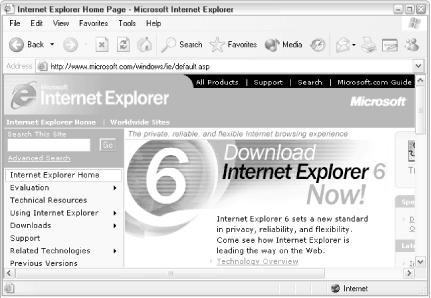
Figure 4-45. Internet Explorer 6.0 is the default web browser in Windows XP
Navigation in IE is accomplished by clicking hyperlinks in web pages or by typing addresses in IE’s Address Bar. Frequently visited sites can be “bookmarked” by creating Internet Shortcuts (similar to Windows Shortcuts), stored in your Favorites folder, your Desktop, or anywhere else on your hard disk.
Use the Back and Next buttons (Alt-left arrow and Alt-right arrow, respectively) to navigate through the history, which is empty in each new IE window that is opened. Use the Stop button (or press ESC) to stop the loading of a page, and use the Refresh button (or press F5) to reload the page, displaying any changes that might have been made or displaying an updated version ...
Read now
Unlock full access


 O’Reilly covers everything we've got, with content to help us build a world-class technology community, upgrade the capabilities and competencies of our teams, and improve overall team performance as well as their engagement.I wanted to learn C and C++, but it didn't click for me until I picked up an O'Reilly book. When I went on the O’Reilly platform, I was astonished to find all the books there, plus live events and sandboxes so you could play around with the technology.I’ve been on the O’Reilly platform for more than eight years. I use a couple of learning platforms, but I'm on O'Reilly more than anybody else. When you're there, you start learning. I'm never disappointed.I'm always learning. So when I got on to O'Reilly, I was like a kid in a candy store. There are playlists. There are answers. There's on-demand training. It's worth its weight in gold, in terms of what it allows me to do.