January 2005
Intermediate to advanced
688 pages
25h 59m
English
Remote Assistance —
\windows\system32\rcimlby.exe -LaunchRA
Allow others to connect to your computer using Remote Desktop Connection.
Start → Programs → Remote Assistance
Command Prompt →
rcimlby -LaunchRA
Remote Assistance is a page in the Help and Support Center (discussed earlier in this chapter) that works with several other Windows components to allow another user to connect to your computer. The idea is that you would invite a technical support representative, a friend, or co-worker, to help you with a computer problem by allowing them to connect to your computer as though they were sitting in front of it (see Figure 4-80).
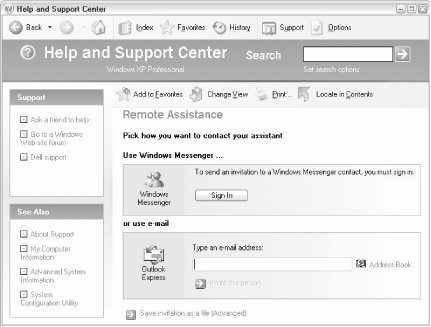
Figure 4-80. Use Remote Assistance to invite another person to connect to your computer with Remote Desktop Sharing
The first step involves inviting another user to connect. While it may seem like an unnecessary formality, it takes care of the very important step of transmitting your IP address to the other user. You can either use Windows Messenger (discussed later in this chapter) to send an instant message or Outlook Express (discussed earlier in this chapter) to send an email. Once the invitation has been received, that user will have enough information to connect to your computer via Remote Desktop Connection (discussed later in this chapter).
Both users must be running Windows XP to use Remote Assistance.
Remote Assistance ...
Read now
Unlock full access


 O’Reilly covers everything we've got, with content to help us build a world-class technology community, upgrade the capabilities and competencies of our teams, and improve overall team performance as well as their engagement.I wanted to learn C and C++, but it didn't click for me until I picked up an O'Reilly book. When I went on the O’Reilly platform, I was astonished to find all the books there, plus live events and sandboxes so you could play around with the technology.I’ve been on the O’Reilly platform for more than eight years. I use a couple of learning platforms, but I'm on O'Reilly more than anybody else. When you're there, you start learning. I'm never disappointed.I'm always learning. So when I got on to O'Reilly, I was like a kid in a candy store. There are playlists. There are answers. There's on-demand training. It's worth its weight in gold, in terms of what it allows me to do.