January 2005
Intermediate to advanced
688 pages
25h 59m
English
Menus
The menu is a place where you can cram all the functionality of a program. Rather than littering your screen with all available commands, they are categorically arranged into cascading lists, as shown in Figure 3-16. Modern applications have become so elaborate, however, that menus are often very complex, making it a pain to have to sift through them all to find the command you want. Thus, designers invented toolbars (discussed later in this chapter) as shortcuts for the items we actually use. It makes us wonder, then, why we need menus in the first place?
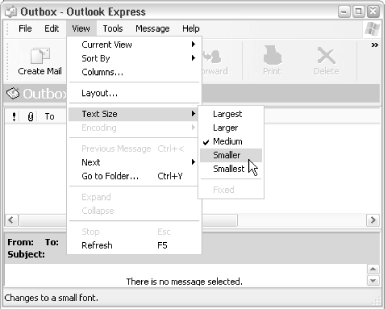
Figure 3-18. Nested ( cascading) menus provide access to all options and features of an application
If you ever get lost, menus tend to be pretty consistent across applications. For example, you can almost always find Open, Save, Print, and Exit in the File menu, just as Cut, Copy, Paste, and Undo are always in the Edit menu.
See Chapter 2 for more information on using menus. See “Context Menus”, earlier in this chapter, for details on the menu that appears when you right-click on something.
Press F10 or Alt (by itself) to enter the menu, use the cursor keys to navigate, and press Enter to select an item. Once you’re in the menus, press the underlined letter of a menu item to quickly jump to that item, or if no letter is underlined, press the first letter of the item’s caption. You can also jump right to a specific ...
Read now
Unlock full access


 O’Reilly covers everything we've got, with content to help us build a world-class technology community, upgrade the capabilities and competencies of our teams, and improve overall team performance as well as their engagement.I wanted to learn C and C++, but it didn't click for me until I picked up an O'Reilly book. When I went on the O’Reilly platform, I was astonished to find all the books there, plus live events and sandboxes so you could play around with the technology.I’ve been on the O’Reilly platform for more than eight years. I use a couple of learning platforms, but I'm on O'Reilly more than anybody else. When you're there, you start learning. I'm never disappointed.I'm always learning. So when I got on to O'Reilly, I was like a kid in a candy store. There are playlists. There are answers. There's on-demand training. It's worth its weight in gold, in terms of what it allows me to do.