January 2005
Intermediate to advanced
688 pages
25h 59m
English
Folder Options
Control the way folders appear in Explorer and configure file type associations.
Control Panel → [Appearance and Themes] → Folder Options
Windows Explorer → Tools → Folder Options
Command Prompt →
control folders
The Folder Options window has four tabs:
Of the three settings on this page, the one that may not be entirely self-explanatory is the Tasks section (see Figure 4-34). Microsoft has removed the highly criticized Web View found in earlier versions of Windows and added an optional feature called Common Tasks. When enabled, a common tasks pane appears along the left side of folder listings in Explorer and single-folder windows, which contains information and links related to the currently selected folder. Those new to Windows might appreciate the extra information, although advanced users will probably prefer to turn off Common Tasks to reduce screen clutter.
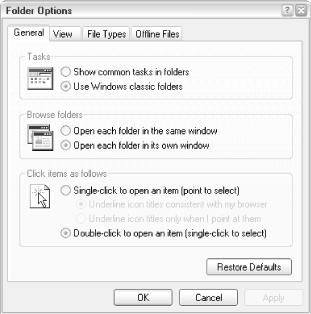
Figure 4-34. Among other things, the General tab lets you turn off the common tasks pane shown in many single folder windows
Of note in the Common Tasks pane is the feature to turn on or off the category view in Control Panel (covered earlier in this chapter), an otherwise unavailable setting.
After you’ve selected all your preferences in the General and View tabs, as well as Explorer’s View menu, click Apply to All Folders to make your settings the default. Otherwise, all ...
Read now
Unlock full access


 O’Reilly covers everything we've got, with content to help us build a world-class technology community, upgrade the capabilities and competencies of our teams, and improve overall team performance as well as their engagement.I wanted to learn C and C++, but it didn't click for me until I picked up an O'Reilly book. When I went on the O’Reilly platform, I was astonished to find all the books there, plus live events and sandboxes so you could play around with the technology.I’ve been on the O’Reilly platform for more than eight years. I use a couple of learning platforms, but I'm on O'Reilly more than anybody else. When you're there, you start learning. I'm never disappointed.I'm always learning. So when I got on to O'Reilly, I was like a kid in a candy store. There are playlists. There are answers. There's on-demand training. It's worth its weight in gold, in terms of what it allows me to do.