January 2005
Intermediate to advanced
688 pages
25h 59m
English
Properties
The Properties window (sometimes called the Properties sheet) is a dialog box that serves a very specific purpose: to display and allow changes to the settings associated with a file, folder, or other object in Windows. Most objects have Properties sheets, almost always accessible by right-clicking and selecting Properties, as shown in Figure 3-19. (You can also display Properties by holding Alt and double-clicking, or if the item is already highlighted, by pressing Alt-Enter.) Many items in the Control Panel can be quickly accessed by right-clicking on various interface elements and selecting Properties; for example:
My Network Places icon → Properties points to Network Connections
Empty portion of the Desktop → Properties points to Display Properties
My Computer icon → Properties points to System Properties
Taskbar or Start button → Properties points to Taskbar and Start Menu Properties
Clock (in the notification area) → Properties points to Time and Date Properties
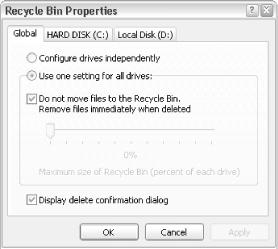
Figure 3-21. Right-click an item and select Properties to display the item’s Properties dialog, often a good place to find extra features and settings
At minimum, most Properties sheets will have a General tab, but most have more. Note that the particular information and settings available depend entirely on the object that was clicked.
Folders, printers, and disk drives have a second property tab ...
Read now
Unlock full access


 O’Reilly covers everything we've got, with content to help us build a world-class technology community, upgrade the capabilities and competencies of our teams, and improve overall team performance as well as their engagement.I wanted to learn C and C++, but it didn't click for me until I picked up an O'Reilly book. When I went on the O’Reilly platform, I was astonished to find all the books there, plus live events and sandboxes so you could play around with the technology.I’ve been on the O’Reilly platform for more than eight years. I use a couple of learning platforms, but I'm on O'Reilly more than anybody else. When you're there, you start learning. I'm never disappointed.I'm always learning. So when I got on to O'Reilly, I was like a kid in a candy store. There are playlists. There are answers. There's on-demand training. It's worth its weight in gold, in terms of what it allows me to do.