Skip to Content
Serverless computing in Azure with .NET
book

Serverless computing in Azure with .NET

by Sasha Rosenbaum
August 2017
Intermediate to advanced
468 pages
12h 5m
English
Packt Publishing
Content preview from Serverless computing in Azure with .NET

Creating a test project

Let's take a look at the following steps to create a test project:
  1. Open the TextEvaluation project in Visual Studio
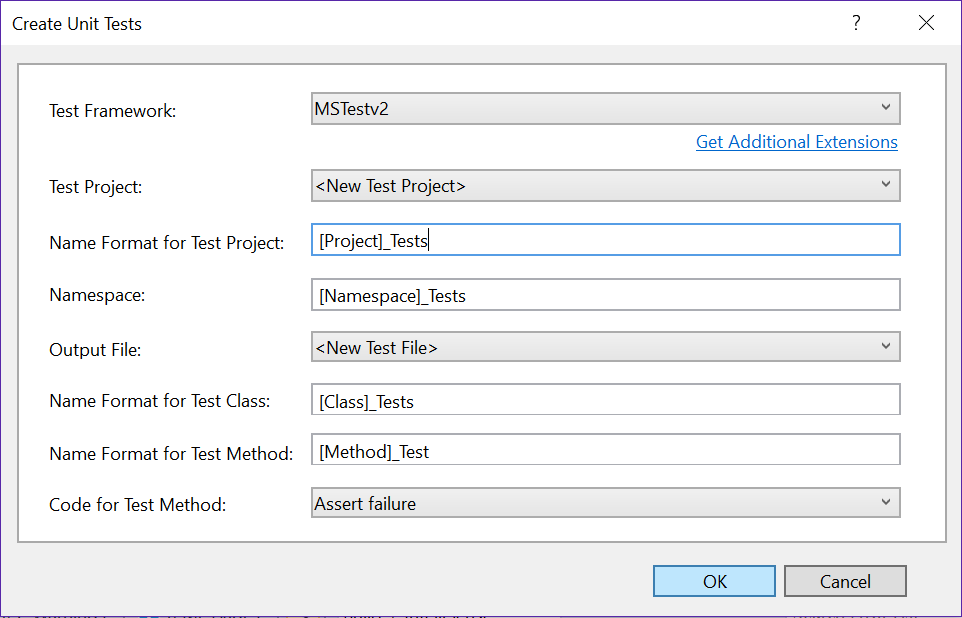
  2. To create a test project, and autogenerate tests for a class, you can right-click on the class name, and choose Create Unit Tests. The following dialog will open, allowing you to choose the target test project and the naming approach:
  1. The auto generate functionality will generate code similar to the following:
        using System;        using Microsoft.VisualStudio.TestTools.UnitTesting;        using TextEvaluation;        namespace TextEvaluation_Tests        {           [TestClass()]         public class AverageResults_Tests         {             [TestMethod()]    public ...
Become an O’Reilly member and get unlimited access to this title plus top books and audiobooks from O’Reilly and nearly 200 top publishers, thousands of courses curated by job role, 150+ live events each month,
and much more.
Start your free trial

You might also like

Mastering Azure Serverless Computing

Mastering Azure Serverless Computing

Lorenzo Barbieri, Massimo Bonanni
Implementing Azure: Putting Modern DevOps to Use

Implementing Azure: Putting Modern DevOps to Use

Florian Klaffenbach, Oliver Michalski, Markus Klein, Mohamed Wali

Publisher Resources

ISBN: 9781787288393Supplemental Content