February 2005
Beginner to intermediate
608 pages
22h 4m
English
Tax agencies require that you regularly submit forms documenting the payroll taxes and withholdings you're supposed to remit and how much you've already sent in. Depending on the QuickBooks payroll service you use, the program can print payroll tax forms for you. Standard Payroll provides federal tax forms. If you subscribe to Enhanced Payroll Plus, you can generate federal and state tax forms. Although the forms that QuickBooks produces aren't exact replicas of the preprinted forms you might receive from the government, they are close enough that you can send them in without fear of rejection.
Many tax agencies are moving to phone and electronic filing. If you use one of these filing options, choose Reports→Employees & Payroll and then choose a report, such as Employee State Taxes Detail to obtain the values you need for your filing.
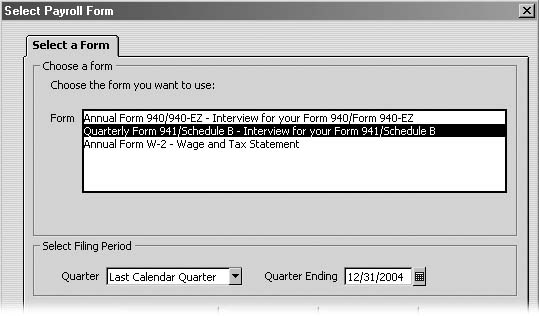
Figure 11-11. How you specify the filing period varies by form. If you choose the Quarterly Form 941, in the Quarter drop-down list, choose the quarter for which you want to generate a report. QuickBooks changes the date in the Quarter Ending box to match the quarter you choose. Form 940 requires only the filing year, and W-2s don't need anything.
Regardless of which tax form you want to generate, the steps are basically the same:
Choose Employees→Process Payroll Forms.
QuickBooks opens the Select Form Type dialog box, which ...
Read now
Unlock full access


 O’Reilly covers everything we've got, with content to help us build a world-class technology community, upgrade the capabilities and competencies of our teams, and improve overall team performance as well as their engagement.I wanted to learn C and C++, but it didn't click for me until I picked up an O'Reilly book. When I went on the O’Reilly platform, I was astonished to find all the books there, plus live events and sandboxes so you could play around with the technology.I’ve been on the O’Reilly platform for more than eight years. I use a couple of learning platforms, but I'm on O'Reilly more than anybody else. When you're there, you start learning. I'm never disappointed.I'm always learning. So when I got on to O'Reilly, I was like a kid in a candy store. There are playlists. There are answers. There's on-demand training. It's worth its weight in gold, in terms of what it allows me to do.