February 2005
Beginner to intermediate
608 pages
22h 4m
English
Many of QuickBooks' built-in reports calculate subtotals. For instance, Profit & Loss summary reports include subtotals by income, cost of goods sold, expenses, and so on. Sales reports by customer subtotal the sales for all the jobs you do for a customer.
When you create a detailed report, such as Sales by Customer Detail, the report shows every transaction for that report, and you can subtotal the results in any way that makes sense for that type of report, as demonstrated in Figure 19-11.
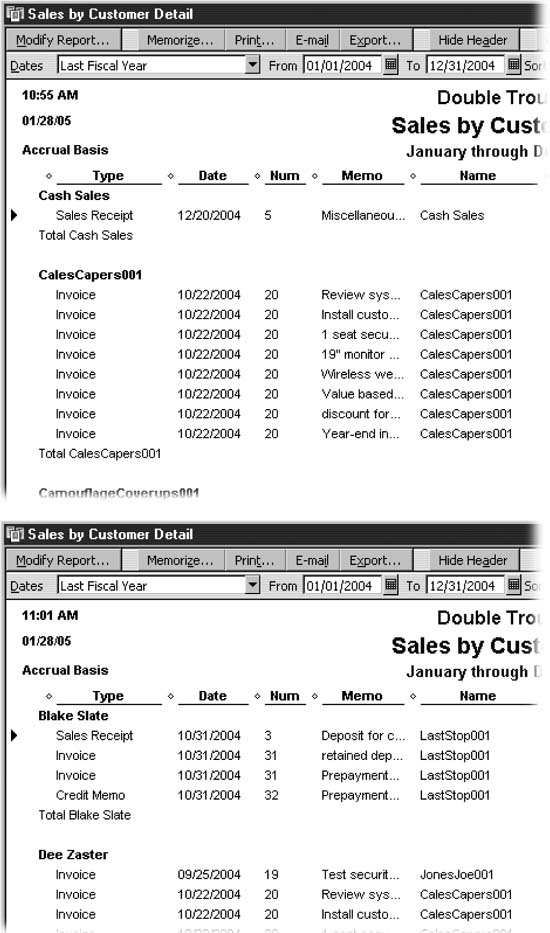
Figure 19-11. Top: When you run a report with transactions details, QuickBooks picks a category for subtotals. For example, the Sales By Customer Detail report totals sales by customer. To change the subtotal category, in the report window, click Modify Report, and in the "Total by" box, choose another field, such as Class or Customer Type. Bottom: This report shows the result of subtotaling by class, here showing the sales by each partner.
Depending on the report you pick, some choices in the "Total by" drop-down list are more appropriate than others. For example, you might decide to subtotal a sales report by Customer Type, Rep, or the Account list to see which types of customer provide the most business, which sales rep makes the most sales, or which income account pulls in the highest sales. Subtotaling a sales report by Workman's Comp Code doesn't make any sense—and QuickBooks isn't ...
Read now
Unlock full access


 O’Reilly covers everything we've got, with content to help us build a world-class technology community, upgrade the capabilities and competencies of our teams, and improve overall team performance as well as their engagement.I wanted to learn C and C++, but it didn't click for me until I picked up an O'Reilly book. When I went on the O’Reilly platform, I was astonished to find all the books there, plus live events and sandboxes so you could play around with the technology.I’ve been on the O’Reilly platform for more than eight years. I use a couple of learning platforms, but I'm on O'Reilly more than anybody else. When you're there, you start learning. I'm never disappointed.I'm always learning. So when I got on to O'Reilly, I was like a kid in a candy store. There are playlists. There are answers. There's on-demand training. It's worth its weight in gold, in terms of what it allows me to do.