February 2005
Beginner to intermediate
608 pages
22h 4m
English
If you stare off into space and start mumbling "Debits increase asset accounts" every time you create a general journal entry, it's wise to check that the general journal entry did what you wanted. Those savvy in the ways of accounting can visualize debits and offsetting credits in their heads, But for novices, thinking about the changes you expect in your profit and loss report or balance sheet is easier.
For example, if you plan to create a journal entry to reassign expenses in the Uncategorized Expenses account to their proper expense accounts homes, you'd expect to see the value in the Uncategorized Expenses account drop to zero while the values in the correct expense accounts increase. Figure 13-4 shows how you use a profit and loss report (see page 372) to check your general journal entries.
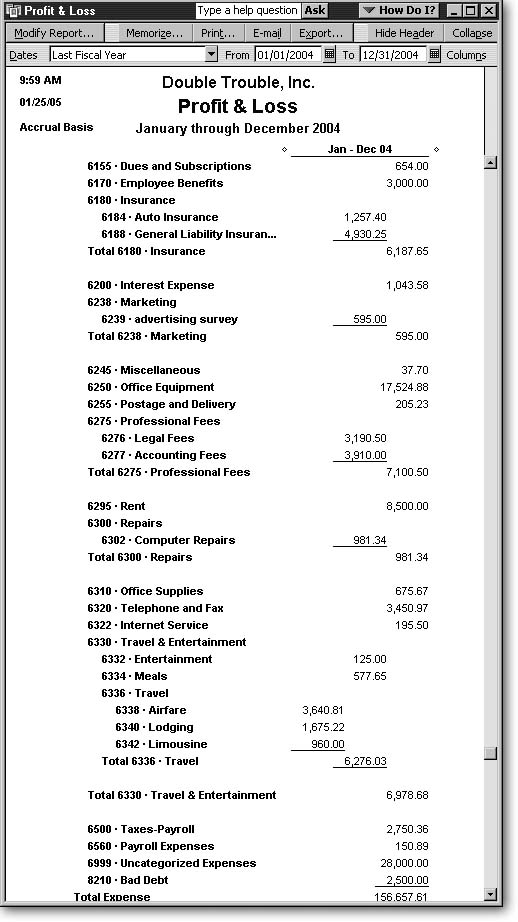
Figure 13-4. Top: Before you create your general journal entry, review your Profit & Loss report to look at the accounts that you expect to change. Here, the Uncategorized Expenses account has $28,000 in it. The Employee Benefits account and Internet Service accounts, which are the destination for your uncategorized expenses, have $3,000 and $195.50, respectively. Bottom: After the general journal entry reassigns the expenses, the Uncategorized Expenses account drops to $0, as you would expect, and the Employee Benefits and Internet Services accounts have increased. ...
Read now
Unlock full access


 O’Reilly covers everything we've got, with content to help us build a world-class technology community, upgrade the capabilities and competencies of our teams, and improve overall team performance as well as their engagement.I wanted to learn C and C++, but it didn't click for me until I picked up an O'Reilly book. When I went on the O’Reilly platform, I was astonished to find all the books there, plus live events and sandboxes so you could play around with the technology.I’ve been on the O’Reilly platform for more than eight years. I use a couple of learning platforms, but I'm on O'Reilly more than anybody else. When you're there, you start learning. I'm never disappointed.I'm always learning. So when I got on to O'Reilly, I was like a kid in a candy store. There are playlists. There are answers. There's on-demand training. It's worth its weight in gold, in terms of what it allows me to do.