February 2005
Beginner to intermediate
608 pages
22h 4m
English
Banks that work with direct connections can do more than those that use WebConnect. Depending on which services your bank offers, you can do some or all of these tasks online:
Transfer funds between accounts.
Receive transactions that cleared in your account.
Pay bills.
Exchange messages with your bank.
If you have an email address for your bank, you can send messages from outside QuickBooks (that is, from your regular old email program). But when you use online banking services, your bank sends you messages that you receive in the Online Banking Center. By sending messages back through the Online Banking Center, you can see all the messages that you've exchanged (until you decide to delete them).
Choose Banking→Create Online Banking Message. QuickBooks opens the Online Banking Message dialog box. If you're addicted to email communication, the fields shown in Figure 20-5 should be very familiar.
When you have two accounts at the same financial institution and they're both enabled for online banking services, you can set up online funds transfers in QuickBooks.
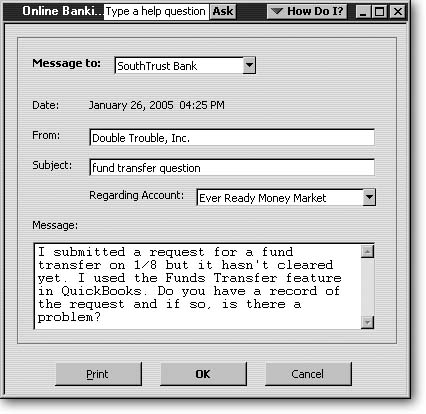
Figure 20-5. In the "Message to" drop-down list, choose the bank you want to send a message to. QuickBooks automatically timestamps the message with the current date and time and adds your company name to the From box. In ...
Read now
Unlock full access


 O’Reilly covers everything we've got, with content to help us build a world-class technology community, upgrade the capabilities and competencies of our teams, and improve overall team performance as well as their engagement.I wanted to learn C and C++, but it didn't click for me until I picked up an O'Reilly book. When I went on the O’Reilly platform, I was astonished to find all the books there, plus live events and sandboxes so you could play around with the technology.I’ve been on the O’Reilly platform for more than eight years. I use a couple of learning platforms, but I'm on O'Reilly more than anybody else. When you're there, you start learning. I'm never disappointed.I'm always learning. So when I got on to O'Reilly, I was like a kid in a candy store. There are playlists. There are answers. There's on-demand training. It's worth its weight in gold, in terms of what it allows me to do.