Skip to Content
Microsoft® Exchange Server 2007 Administrator's Companion
book

Microsoft® Exchange Server 2007 Administrator's Companion

by Walter Glenn, Scott Lowe, Joshua Maher
June 2007
Intermediate to advanced
720 pages
20h 39m
English
Microsoft Press
Content preview from Microsoft® Exchange Server 2007 Administrator's Companion

OWA User Features

In this section, you take a quick look at the OWA user interface. When the user opens OWA, the default interface is very similar to Outlook 2007 (see Figure 24-12), in which the panes have a vertical format. The user who wants a more traditional view of Outlook can change this default presentation by clicking the Show/Hide Preview Pane button.
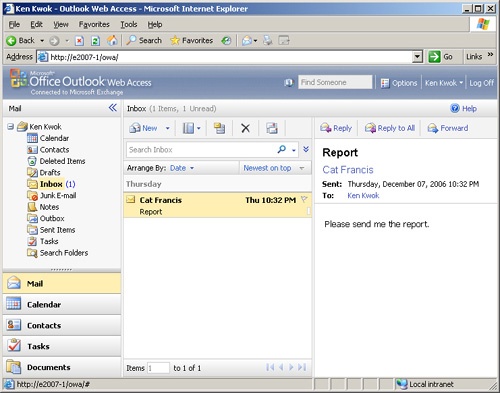
The default OWA interface is focused on the user’s Inbox.

Figure 24-12. The default OWA interface is focused on the user’s Inbox.

Through the OWA interface, users can also set configuration options for the following:

  • Out of Office Assistant

  • Messaging

  • Spelling

  • Secure messaging

  • Privacy and junk e-mail prevention

  • Date and time formats

  • Calendar

  • Reminders

  • Contacts ...

Become an O’Reilly member and get unlimited access to this title plus top books and audiobooks from O’Reilly and nearly 200 top publishers, thousands of courses curated by job role, 150+ live events each month,
and much more.
Start your free trial

You might also like

Microsoft® Exchange Server 2007 Administrator’s Companion, Second Edition

Microsoft® Exchange Server 2007 Administrator’s Companion, Second Edition

Scott Lowe Walter Glenn and Joshua Maher
Microsoft® Exchange Server 2007 Unleashed

Microsoft® Exchange Server 2007 Unleashed

Ph.D. - MCSE Rand H. Morimoto, MVP Michael Noel - MCSE, Andrew Abbate - MCSE, CISSP Chris Amaris - MCSE, Mark Weinhardt - MCSE

Publisher Resources

ISBN: 9780735623507Supplemental ContentCatalog PageErrata