November 2009
Intermediate to advanced
432 pages
11h 18m
English
Publishers need to take the following fairly simple steps to place ad units on your site:
Sign up with a program.
Select the ad format that works best with your site.
Add the code generated by the program to your pages.
Bear in mind the suggestion in Chapter 1 that ad unit code be placed within an include architecture, allowing the flexibility to change ads across multiple pages, portions of sites, or entire sites. In addition, placing the ad code within an include means that you can easily switch who you work with.
Figure 6-4 shows the AdBrite signup form, which is pretty typical of most programs.
You’ll also need to provide who you want checks made out to and a tax identification number (either a Social Security number or an employer identification number).
Many programs also require that you complete and submit a W-9 tax form.
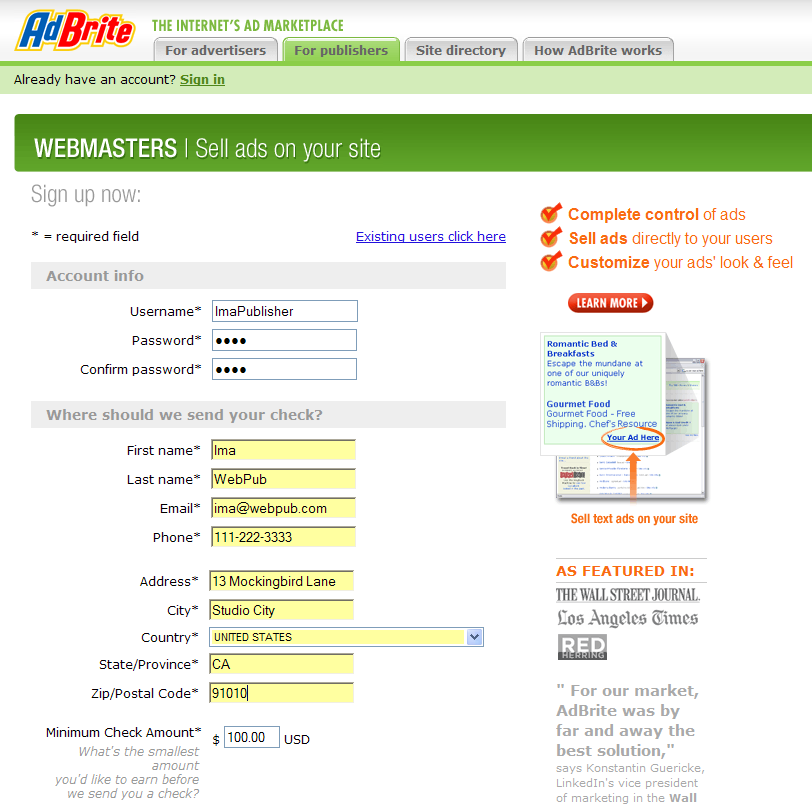
Figure 6-4. Simple contact information plus a tax ID number is all you need to enroll in a CPC program
In addition, some of the programs (such as Google) will want at least one website URL. They will manually vet the site for compliance with program content policies before accepting you into the program.
Once you’ve been accepted, you can choose the kinds of ads you want to serve. On AdBrite, as shown in Figure 6-5, the choices are banner and text versus text only, full-page in-between ads, and ...
Read now
Unlock full access


 O’Reilly covers everything we've got, with content to help us build a world-class technology community, upgrade the capabilities and competencies of our teams, and improve overall team performance as well as their engagement.I wanted to learn C and C++, but it didn't click for me until I picked up an O'Reilly book. When I went on the O’Reilly platform, I was astonished to find all the books there, plus live events and sandboxes so you could play around with the technology.I’ve been on the O’Reilly platform for more than eight years. I use a couple of learning platforms, but I'm on O'Reilly more than anybody else. When you're there, you start learning. I'm never disappointed.I'm always learning. So when I got on to O'Reilly, I was like a kid in a candy store. There are playlists. There are answers. There's on-demand training. It's worth its weight in gold, in terms of what it allows me to do.