November 2009
Intermediate to advanced
432 pages
11h 18m
English
Mobile ads are ads that appear on wireless devices such as the Apple iPhone or Google’s G1. Many sites target these appliances using some variant of wireless markup language. If you advertise a local product or service, particularly one whose customers are most likely to find you on a mobile device, it makes a great deal of sense to place targeted mobile ads.
To create a mobile ad, in AdWords start a new campaign with placements. In the “Create an ad” window, select “Mobile ad,” shown in Figure 14-7.
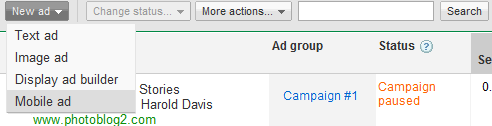
Figure 14-7. Select “Mobile ad” to create an ad targeted at mobile devices
The “Design your mobile ad window,” shown in Figure 14-8, will open. For a text ad, enter the headline, description, and URL. Note that the headline and description are each limited to 18 characters, and the display URL can be no more than 20 characters (if Google CPC text ads are terse, mobile ads are very succinct).
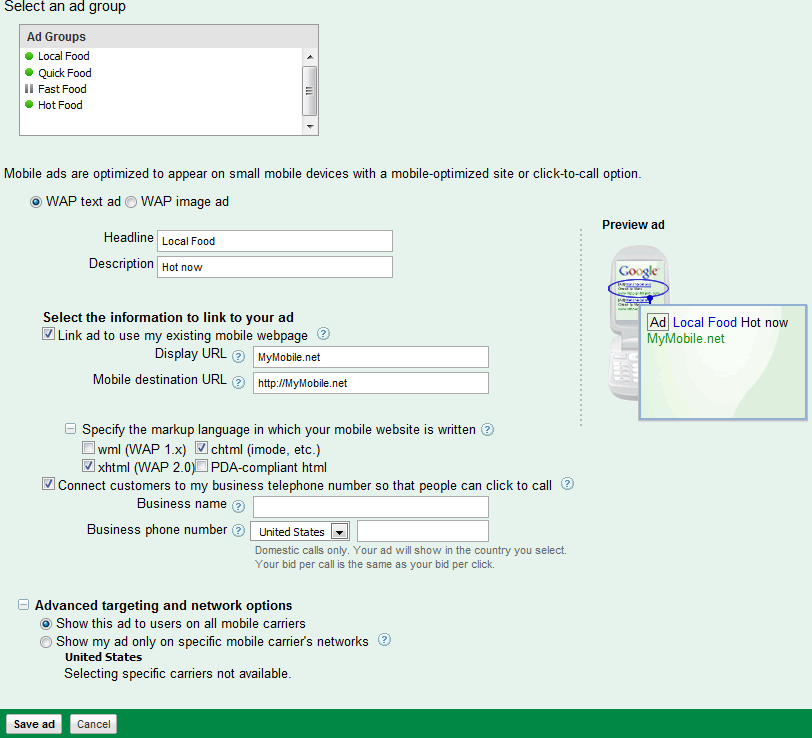
Figure 14-8. Mobile text ads are pretty much like regular CPC ads—but shorter
If you link your business’s phone number to the ad, customers can call you by clicking rather than having to open your mobile web page.
To create a mobile image ad rather than a text ad, choose the Image radio button and upload your ad in one of the specified file sizes, file formats, and aspect ratios, as shown in ...
Read now
Unlock full access


 O’Reilly covers everything we've got, with content to help us build a world-class technology community, upgrade the capabilities and competencies of our teams, and improve overall team performance as well as their engagement.I wanted to learn C and C++, but it didn't click for me until I picked up an O'Reilly book. When I went on the O’Reilly platform, I was astonished to find all the books there, plus live events and sandboxes so you could play around with the technology.I’ve been on the O’Reilly platform for more than eight years. I use a couple of learning platforms, but I'm on O'Reilly more than anybody else. When you're there, you start learning. I'm never disappointed.I'm always learning. So when I got on to O'Reilly, I was like a kid in a candy store. There are playlists. There are answers. There's on-demand training. It's worth its weight in gold, in terms of what it allows me to do.