November 2009
Intermediate to advanced
432 pages
11h 18m
English
A My Client Center (MCC) AdWords account is an umbrella account that allows you to access as many as 1,000 different AdWords accounts using a single window (Figure 10-40).
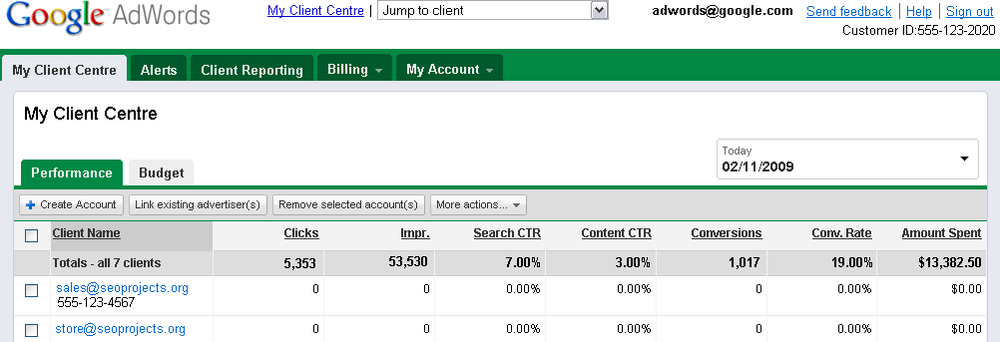
Figure 10-40. If you are responsible for managing multiple AdWords accounts, it’s a great convenience to be able to link all the AdWords accounts in a single client manager account
MCC accounts are primarily intended for advertising professionals who manage multiple AdWords accounts on behalf of clients. To sign up for a client manager account, open the URL https://adwords.google.com/select/ProfessionalWelcome in your browser. Next, click the “Join the Google Advertising Professionals program” link. The Enrollment page will open.
In the Enrollment page, enter your existing Google account that you use for AdWords logon information.
Click Continue Enrollment. In the next window you provide a different (or new) Google account for managing access to your My Client Center. The email address cannot be the same as the one for your existing AdWords account.
An MCC account acts as a container for multiple AdWords accounts (just as each AdWords client account is a container for ad campaigns, which in turn are containers for ad groups). Besides making it easier to manage multiple AdWords accounts, client manager accounts provide a number of other benefits, including the ability to enroll in the ...
Read now
Unlock full access


 O’Reilly covers everything we've got, with content to help us build a world-class technology community, upgrade the capabilities and competencies of our teams, and improve overall team performance as well as their engagement.I wanted to learn C and C++, but it didn't click for me until I picked up an O'Reilly book. When I went on the O’Reilly platform, I was astonished to find all the books there, plus live events and sandboxes so you could play around with the technology.I’ve been on the O’Reilly platform for more than eight years. I use a couple of learning platforms, but I'm on O'Reilly more than anybody else. When you're there, you start learning. I'm never disappointed.I'm always learning. So when I got on to O'Reilly, I was like a kid in a candy store. There are playlists. There are answers. There's on-demand training. It's worth its weight in gold, in terms of what it allows me to do.