June 2004
Intermediate to advanced
1056 pages
39h 58m
English
Mac
OS X’s Finder manages your Classic applications like
any other; the only difference is that they’re
stored in /Applications (Mac OS 9), not in
/Applications. When Classic is running, you
won’t work with the old Mac OS 9 Finder; however,
when a Classic application is running in the foreground, the menu bar
changes to that of Mac OS 9. Similarly, the Dock provides space for
the icons of Classic applications and even lets you keep them in the
Dock.
You can easily identify a Classic application in the Dock, because its icon has a Mac OS 9-style (32 2 pixel) icon, which looks “jaggy” if viewed at a higher resolution.
As mentioned earlier, Mac OS 9 applications
don’t benefit from Mac OS X’s
protected memory space or its dynamic memory allocation. In Classic,
a Mac OS 9 application is still a Mac OS 9 application, requiring you
to assign memory the old way: via the Get Info window. Figure 3-6
shows the Get Info window for Mac OS 9’s Script
Editor (/Applications (Mac OS 9)/Apple
Extras/AppleScript).
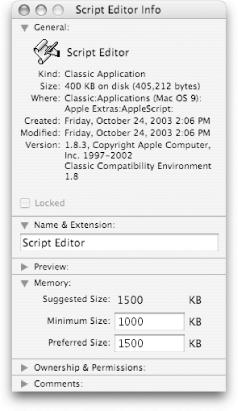
Figure 3-6. Mac OS 9’s Script Editor’s Info window, showing the Memory section
The Memory section of the Info window (available only for Classic applications) lists the following three items:
This number represents the amount of RAM (in kilobytes) that the application’s developers suggest to get optimum performance from ...
Read now
Unlock full access


 O’Reilly covers everything we've got, with content to help us build a world-class technology community, upgrade the capabilities and competencies of our teams, and improve overall team performance as well as their engagement.I wanted to learn C and C++, but it didn't click for me until I picked up an O'Reilly book. When I went on the O’Reilly platform, I was astonished to find all the books there, plus live events and sandboxes so you could play around with the technology.I’ve been on the O’Reilly platform for more than eight years. I use a couple of learning platforms, but I'm on O'Reilly more than anybody else. When you're there, you start learning. I'm never disappointed.I'm always learning. So when I got on to O'Reilly, I was like a kid in a candy store. There are playlists. There are answers. There's on-demand training. It's worth its weight in gold, in terms of what it allows me to do.