May 2000
Intermediate to advanced
620 pages
18h 2m
English
The second plastic button at the bottom of a Palm device, marked with a telephone-handset icon, launches the Address Book program. It presents a neat master list of all your contacts, sorted by last name and displaying each person’s principal phone number. (See Figure 4.16.)
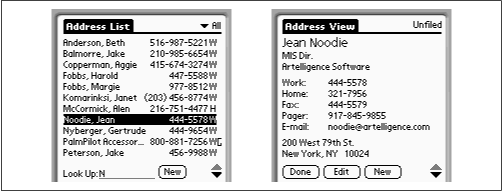
Figure 4-16. The Address Book starts with a home page of all your phone numbers (left). Tap a name to open its detail view for that name (right).
If your world of acquaintances includes 11 people or less, you can stop reading here: 11 names fit on a single “page” of the screen list.
If the person whose number you’re looking up isn’t among the first 11 listed, however, begin writing the person’s last name in the Graffiti writing area. With each letter you write, the phone-book list scrolls to the name that most closely matches what you’ve written so far. In other words, even if you have thousands of names in the list, you can home in on a single acquaintance by writing only about three letters of the name. (In Figure 4.16, writing a single letter, N, sufficed to find Jean Noodie’s entry.)
Alternatively, you can press the plastic up/down scroll buttons at the bottom of the PalmPilot—or tap the up/down black triangle buttons on the screen—to view the previous or next screens full of names.
And if you still can’t find the name you’re looking for—for example, if you can’t remember some guy’s name, but ...
Read now
Unlock full access


 O’Reilly covers everything we've got, with content to help us build a world-class technology community, upgrade the capabilities and competencies of our teams, and improve overall team performance as well as their engagement.I wanted to learn C and C++, but it didn't click for me until I picked up an O'Reilly book. When I went on the O’Reilly platform, I was astonished to find all the books there, plus live events and sandboxes so you could play around with the technology.I’ve been on the O’Reilly platform for more than eight years. I use a couple of learning platforms, but I'm on O'Reilly more than anybody else. When you're there, you start learning. I'm never disappointed.I'm always learning. So when I got on to O'Reilly, I was like a kid in a candy store. There are playlists. There are answers. There's on-demand training. It's worth its weight in gold, in terms of what it allows me to do.