December 2009
Beginner
416 pages
9h 53m
English
Template overrides are a powerful aspect of Joomla. They allow you to customize the look and functionality of your site without altering core code. This helps in many ways, including not breaking your site when updates are installed or reverting changes if you make a mistake.
The Joomla MVC, which stands for Model View Controller, looks like Figure 11-16 from a bird’s-eye view.
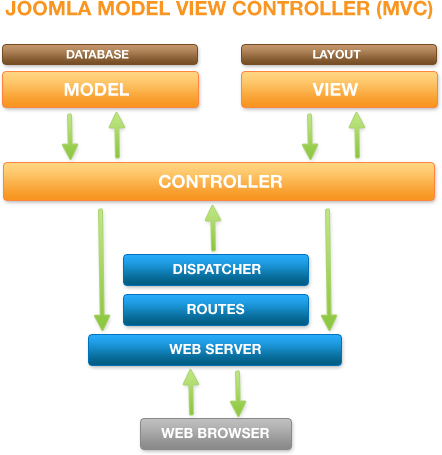
Figure 11-16. The Joomla Model View Controller (MVC)
Not all Joomla 1.5 components follow this design pattern, but most do. Look for a folder called views in the component folder to confirm it does.
Do not be too concerned if you don’t completely understand how MVC works. To be honest, we know a few seasoned developers that don’t fully understand it, either. The important thing to know is the presentation layer (also called View) is separate from the rest of the extension. Before Joomla loads a view file for an extension, it first checks to see if a template override for a given view file exists in the html folder inside the current template folder. If it finds one, it will use that overriding file instead of the one packaged with the extension.
You can only use template overrides on components and modules, not plug-ins.
Creating a template override is easiest to understand if you see an example, so let’s create a template override for the login module (mod_login). Some components ...
Read now
Unlock full access


 O’Reilly covers everything we've got, with content to help us build a world-class technology community, upgrade the capabilities and competencies of our teams, and improve overall team performance as well as their engagement.I wanted to learn C and C++, but it didn't click for me until I picked up an O'Reilly book. When I went on the O’Reilly platform, I was astonished to find all the books there, plus live events and sandboxes so you could play around with the technology.I’ve been on the O’Reilly platform for more than eight years. I use a couple of learning platforms, but I'm on O'Reilly more than anybody else. When you're there, you start learning. I'm never disappointed.I'm always learning. So when I got on to O'Reilly, I was like a kid in a candy store. There are playlists. There are answers. There's on-demand training. It's worth its weight in gold, in terms of what it allows me to do.