December 2009
Beginner
416 pages
9h 53m
English
The Tools menu contains a set of tools that aid in maintaining a healthy website. Even though they may be seldom used, they serve an important purpose when needed.
When an article is edited, Joomla will lock it so that multiple users can’t edit it at the same time. The article (this also applies to components, sections, categories, and menu items) is unlocked when you click the Save or Close buttons in the toolbar when editing. When you close the browser without clicking Save or Close, your session expires, or you just navigate away from an open article, you never unlock it. When this happens, no one else can edit it. This is actually a great feature and prevents website administrators from “content conflict.” However, we’re all human and sometimes we forget to close an article properly.
When items are being edited, the checkboxes next to the item names are replaced with a small padlock. If you hover over the padlock as in Figure 16-1, a popup will appear telling you who opened the item and when.
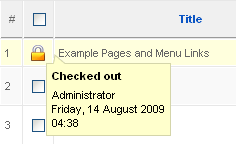
Figure 16-1. Checked-out article in Article Manager
There are two ways to unlock a locked item:
Have the person who has it locked edit the item and click Close.
Use Global Check-in.
To use the Global Check-in feature, click Tools→Global Check-in. Looking at Figure 16-2, you’ll see that Global Check-in not only checks in articles but many other types of items as well. ...
Read now
Unlock full access


 O’Reilly covers everything we've got, with content to help us build a world-class technology community, upgrade the capabilities and competencies of our teams, and improve overall team performance as well as their engagement.I wanted to learn C and C++, but it didn't click for me until I picked up an O'Reilly book. When I went on the O’Reilly platform, I was astonished to find all the books there, plus live events and sandboxes so you could play around with the technology.I’ve been on the O’Reilly platform for more than eight years. I use a couple of learning platforms, but I'm on O'Reilly more than anybody else. When you're there, you start learning. I'm never disappointed.I'm always learning. So when I got on to O'Reilly, I was like a kid in a candy store. There are playlists. There are answers. There's on-demand training. It's worth its weight in gold, in terms of what it allows me to do.