December 2009
Beginner
416 pages
9h 53m
English
Mass Mail is a component that allows you to email users who are registered on your website. You can choose to email everyone or just a select group of individuals. This component works fine for smaller websites, but we wouldn’t recommend it for large sites.
You should check with your host to see if they throttle the number of emails per hour you’re allowed to send out before you’re red-flagged as a potential spammer. The Mass Mail component has no throttling like newsletter components, so use it with care if you’re sending out a lot of emails.
The Mass Mail interface is pretty straightforward. Access Mass Mail by going to Tools→Mass Mail. The Mass Mail interface only has a few options as shown in Figure 16-11.
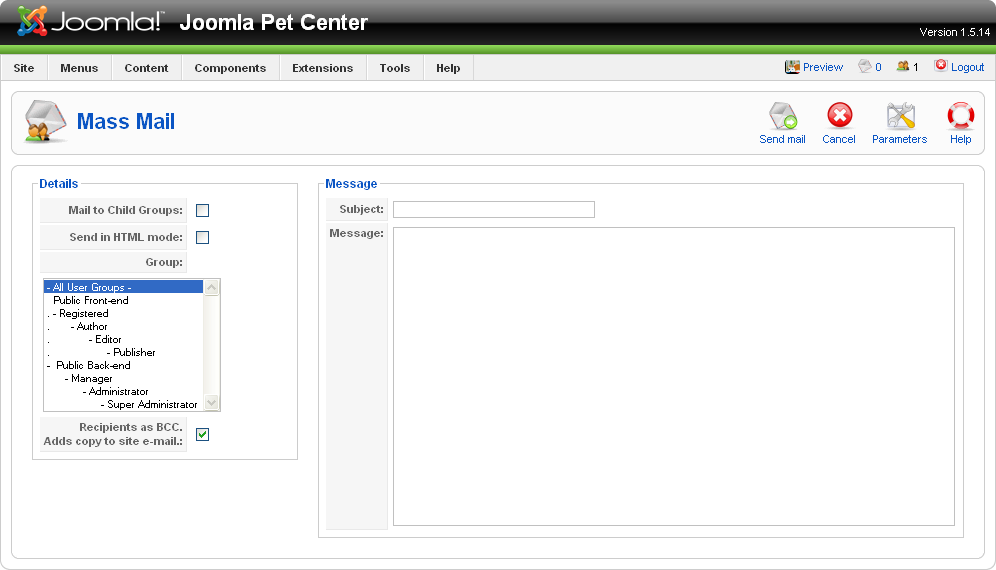
Figure 16-11. Mass Mail interface
If checked, all children of the selected group will be included in the email.
For example, if you selected the group Author and checked the “Mail to Child Groups” checkbox, Editors and Publishers would also receive the email.
If checked, the message will be sent in HTML mode. This is useful if you wish to enter HTML in the message text area.
Select the user groups you wish to send this email to.
User email addresses will be added to the blind carbon copy (BBC) field of the email. This prevents users from seeing the other email addresses the message ...
Read now
Unlock full access


 O’Reilly covers everything we've got, with content to help us build a world-class technology community, upgrade the capabilities and competencies of our teams, and improve overall team performance as well as their engagement.I wanted to learn C and C++, but it didn't click for me until I picked up an O'Reilly book. When I went on the O’Reilly platform, I was astonished to find all the books there, plus live events and sandboxes so you could play around with the technology.I’ve been on the O’Reilly platform for more than eight years. I use a couple of learning platforms, but I'm on O'Reilly more than anybody else. When you're there, you start learning. I'm never disappointed.I'm always learning. So when I got on to O'Reilly, I was like a kid in a candy store. There are playlists. There are answers. There's on-demand training. It's worth its weight in gold, in terms of what it allows me to do.