December 2009
Beginner
416 pages
9h 53m
English
You’ve now seen how a site administrator can create users in the User Manager, but users more commonly register themselves on your website.
The Global Configuration has a few settings that customize the registration process. Those settings were discussed in the User Settings section of Chapter 4. Now, we’ll jump to the frontend of your website to take a look at the user registration process.
For most users, the main point of entry is the Login Module. Figure 12-4 shows the default Login Module.
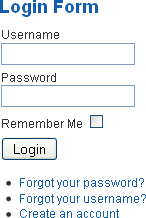
Figure 12-4. Login Module
The top half of the Login Module allows an existing user to enter his login credentials and log in. The Remember Me checkbox gives users the choice for Joomla to remember who they are the next time they return. If users regularly visit your website, this is a nice time-saving feature.
You should never use any sort of Remember Me type of functionality on a public computer. This goes for any website and not just Joomla websites. If the wrong person were to stumble upon a site that automatically logged you back in, they could use your account or information for illegal or unethical purposes.
The bottom half of the Login Module enables users to create an account, retrieve their lost password, or retrieve a forgotten username.
When users create an account on your website, they see less options than an administrator would ...
Read now
Unlock full access


 O’Reilly covers everything we've got, with content to help us build a world-class technology community, upgrade the capabilities and competencies of our teams, and improve overall team performance as well as their engagement.I wanted to learn C and C++, but it didn't click for me until I picked up an O'Reilly book. When I went on the O’Reilly platform, I was astonished to find all the books there, plus live events and sandboxes so you could play around with the technology.I’ve been on the O’Reilly platform for more than eight years. I use a couple of learning platforms, but I'm on O'Reilly more than anybody else. When you're there, you start learning. I'm never disappointed.I'm always learning. So when I got on to O'Reilly, I was like a kid in a candy store. There are playlists. There are answers. There's on-demand training. It's worth its weight in gold, in terms of what it allows me to do.