December 2009
Beginner
416 pages
9h 53m
English
With the advent of instant messaging, this feature becomes less relevant. With the Private Messaging component, you can send private messages to other users with access to the backend of your Joomla site.
The best way to demonstrate how this component works is to send a private message to someone and then read the private message from the other account. Let’s start by writing a private message.
We’re going to suppose that user “kenneth” has asked user “admin” to create a user account for someone. There are two ways to get to our starting point—the Write Private Message screen, shown in Figure 16-6:
Click Tools→Write Message.
Click New in the toolbar from the Private Messaging screen.
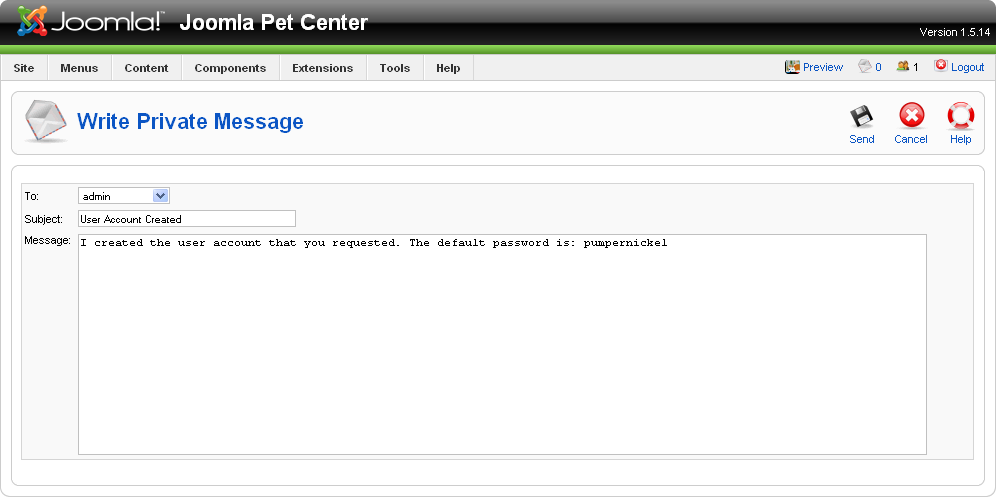
Figure 16-6. Write Private Message screen
The Write Private Message screen has three fields:
This drop-down list contains the usernames of all Managers, Administrators, and Super Administrators. These are the only user types that have access to the backend, so they are the only ones who can receive private messages.
Give your private message a good subject.
Use this text area to write the body of your private message.
When you are done writing your message, click Send.
The mail icon in the upper-right corner tells you how many unread private messages you have. Figure 16-7 shows one unread message in this particular user’s inbox. ...
Read now
Unlock full access


 O’Reilly covers everything we've got, with content to help us build a world-class technology community, upgrade the capabilities and competencies of our teams, and improve overall team performance as well as their engagement.I wanted to learn C and C++, but it didn't click for me until I picked up an O'Reilly book. When I went on the O’Reilly platform, I was astonished to find all the books there, plus live events and sandboxes so you could play around with the technology.I’ve been on the O’Reilly platform for more than eight years. I use a couple of learning platforms, but I'm on O'Reilly more than anybody else. When you're there, you start learning. I'm never disappointed.I'm always learning. So when I got on to O'Reilly, I was like a kid in a candy store. There are playlists. There are answers. There's on-demand training. It's worth its weight in gold, in terms of what it allows me to do.