February 2006
Intermediate to advanced
826 pages
63h 42m
English
List elements may be nested within other lists. For example, you can add an unordered list within a definition list, or a numbered list as an item within an unordered list. This example shows just one variation. The resulting list is shown in Figure 10-2.
    <ol><li>Mix Marinade
        <ul>
        <li>2 slices ginger <em>(smashed)</em></li>
        <li>1 T. rice wine or sake</li>
        <li>1 t. salt</li>
        <li>2 T. peanut oil</li>
        </ul>
    </li>
    <li>Saute the seasonings</li>
    <li>Add fish sauce</li>
    </ol>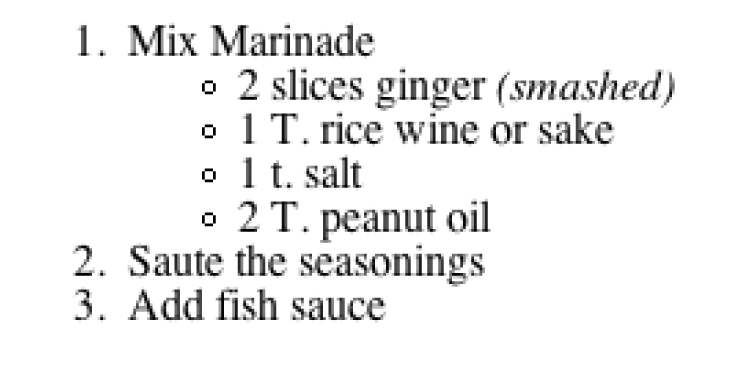
Figure 10-2. Nested lists
Note that in order for the list markup to be valid, ul and ol
elements may contain only li
elements. That means the nested list must be contained within a list
item (li) and may not be a child of
the ul or ol element. Authors should also be careful
to close all elements so they are nested properly and do not
overlap.
When unstyled unordered lists (ul) are nested within each other, browsers
automatically display a different bullet for each consecutive level,
usually disc, then circle, then square. Nested ordered lists all receive
the default Arabic numbering system (1, 2, 3, etc.). Use style sheets to
specify the marker system for each nested list level, as
appropriate.
Read now
Unlock full access


 O’Reilly covers everything we've got, with content to help us build a world-class technology community, upgrade the capabilities and competencies of our teams, and improve overall team performance as well as their engagement.I wanted to learn C and C++, but it didn't click for me until I picked up an O'Reilly book. When I went on the O’Reilly platform, I was astonished to find all the books there, plus live events and sandboxes so you could play around with the technology.I’ve been on the O’Reilly platform for more than eight years. I use a couple of learning platforms, but I'm on O'Reilly more than anybody else. When you're there, you start learning. I'm never disappointed.I'm always learning. So when I got on to O'Reilly, I was like a kid in a candy store. There are playlists. There are answers. There's on-demand training. It's worth its weight in gold, in terms of what it allows me to do.