February 2006
Intermediate to advanced
826 pages
63h 42m
English
At the most basic level, tables are divided into rows and columns. CSS 2.1 describes the model as row primary, because rows are identified explicitly in the document structure. Cells are always descendants of rows, not columns. Columns are merely derived based on the number of cells in the rows.
The intersection of all the rows and columns in a table forms a grid and defines a basic grid cell unit. The actual cells (the boxes that contain the content) in the table may be composed of more than one grid cell, as is the case when cells are set to span rows or columns. Figure 22-1 shows the structure of the CSS table model.
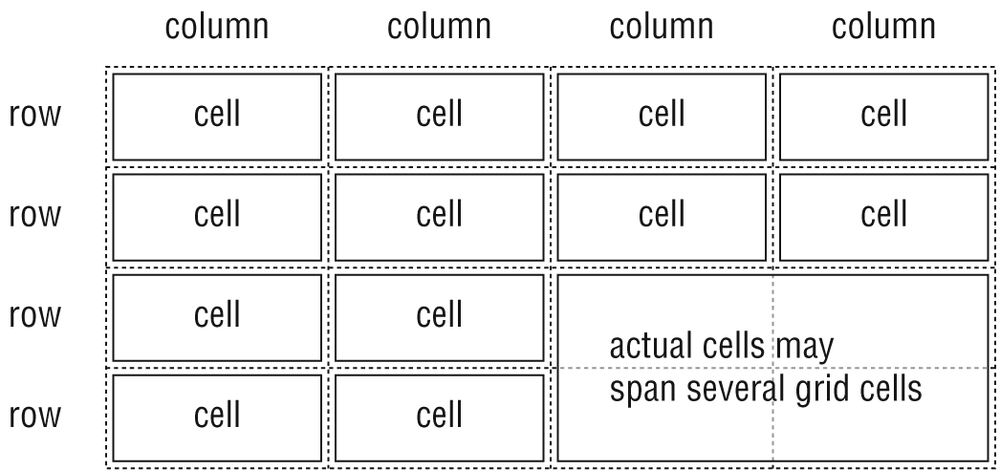
Figure 22-1. Table structure
In addition to cell boxes, the CSS visual box model for tables generates (implied) boxes around rows, row groups, columns, column groups, and the table itself. These boxes correspond to the row, rowgroup, col, colgroup, and table elements in HTML. The table caption (identified with the caption element) is treated as its own box as well (as discussed later in this chapter).
One last table box to be aware of is the inline
table. Inline tables are block elements that can appear inline (tables are normally block-level elements). Inline tables are created by setting the display property to inline-table. They are not discussed in detail in this chapter, but are sometimes referenced in terms of property application. Only the Opera ...
Read now
Unlock full access


 O’Reilly covers everything we've got, with content to help us build a world-class technology community, upgrade the capabilities and competencies of our teams, and improve overall team performance as well as their engagement.I wanted to learn C and C++, but it didn't click for me until I picked up an O'Reilly book. When I went on the O’Reilly platform, I was astonished to find all the books there, plus live events and sandboxes so you could play around with the technology.I’ve been on the O’Reilly platform for more than eight years. I use a couple of learning platforms, but I'm on O'Reilly more than anybody else. When you're there, you start learning. I'm never disappointed.I'm always learning. So when I got on to O'Reilly, I was like a kid in a candy store. There are playlists. There are answers. There's on-demand training. It's worth its weight in gold, in terms of what it allows me to do.