February 2006
Intermediate to advanced
826 pages
63h 42m
English
Figure 23-2 shows the difference between the outside and inside marker positions as indicated by the following styles. Note that the dotted lines are a device to indicate the edges of the content area only and would not actually display.
li.one {list-style-position: outside;}
li.two {list-style-position: inside; }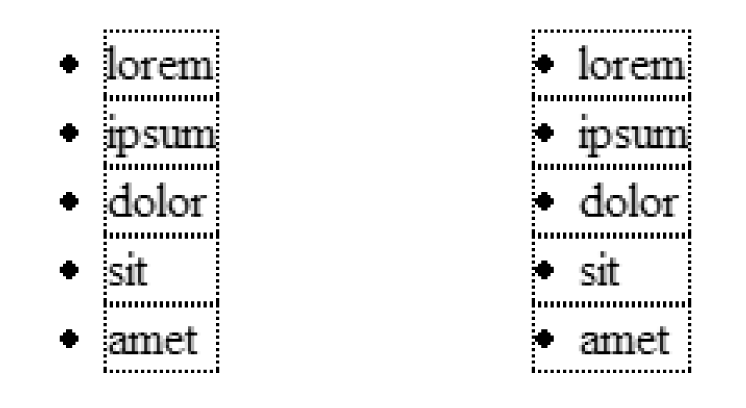
Figure 23-2. list-style-position
Unfortunately, that’s about all you can do with list-style-position. It does not provide a way for authors to adjust the distance or position of the marker relative to the list item. CSS 2.1 leaves the distance to the user agent. Interestingly, CSS 2 included the marker-offset property for this very purpose, but it was dropped in CSS 2.1 because it was determined not to be the best solution for the problem. Look for improved control over marker placement in CSS Level 3.
Internet Explorer for Windows always includes the bullet in the content area box. This can cause some inconsistent results when positioning list blocks or adding borders, padding, and margins to list items.
Read now
Unlock full access


 O’Reilly covers everything we've got, with content to help us build a world-class technology community, upgrade the capabilities and competencies of our teams, and improve overall team performance as well as their engagement.I wanted to learn C and C++, but it didn't click for me until I picked up an O'Reilly book. When I went on the O’Reilly platform, I was astonished to find all the books there, plus live events and sandboxes so you could play around with the technology.I’ve been on the O’Reilly platform for more than eight years. I use a couple of learning platforms, but I'm on O'Reilly more than anybody else. When you're there, you start learning. I'm never disappointed.I'm always learning. So when I got on to O'Reilly, I was like a kid in a candy store. There are playlists. There are answers. There's on-demand training. It's worth its weight in gold, in terms of what it allows me to do.