February 2006
Intermediate to advanced
826 pages
63h 42m
English
GIF files are indexed color images that can contain a maximum of 8-bit color information (they can also be saved at lower bit rates). This means they can contain up to 256 colors—the maximum number that 8 bits of information can define (28 = 256). GIFs may be saved at lower bit depths as well. Lower bit depths result in fewer colors and also reduce file size. This is discussed in the section "Minimizing GIF File Sizes" later in this chapter.
Indexed color means that the set of colors in the image, its palette, is stored in a color table (also called a color map). Each pixel in the image contains a reference (or “index “) to a position in the color table. Figure 29-2 illustrates how a 2-bit indexed color image references its color table for display. In Adobe Photoshop, you can view the table for an indexed color image by selecting Image → Mode → Color Table. The color table is also displayed when you choose GIF in the Save for Web window in Photoshop and the Optimize panel in Adobe ImageReady and Macromedia Fireworks.
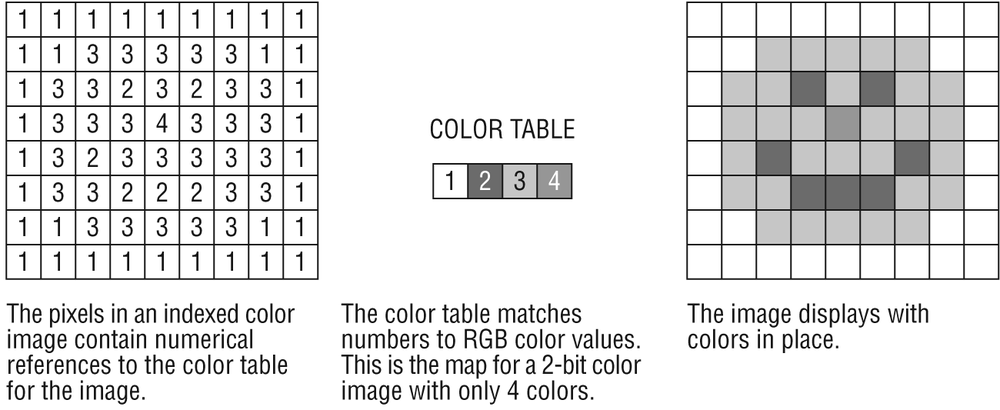
Figure 29-2. A 2-bit indexed color image and its color table
When you convert a 24-bit (millions of colors) image to GIF, the colors in the image must be reduced to a palette of 256 colors or fewer. In Photoshop and Fireworks, the conversion to indexed color happens as part of the Save to Web or Export function. Other image editing programs may require ...
Read now
Unlock full access


 O’Reilly covers everything we've got, with content to help us build a world-class technology community, upgrade the capabilities and competencies of our teams, and improve overall team performance as well as their engagement.I wanted to learn C and C++, but it didn't click for me until I picked up an O'Reilly book. When I went on the O’Reilly platform, I was astonished to find all the books there, plus live events and sandboxes so you could play around with the technology.I’ve been on the O’Reilly platform for more than eight years. I use a couple of learning platforms, but I'm on O'Reilly more than anybody else. When you're there, you start learning. I'm never disappointed.I'm always learning. So when I got on to O'Reilly, I was like a kid in a candy store. There are playlists. There are answers. There's on-demand training. It's worth its weight in gold, in terms of what it allows me to do.