February 2006
Intermediate to advanced
826 pages
63h 42m
English
A rollover can be used to change any aspect of an element’s
appearance. You can change the size or color of the text, its background
color, its decoration, or virtually any property that can be used to
style text. Figure 24-12
shows just a few examples. Styles are applied to the a element, and an alternate style is specified
with the a:hover selector for the
rollover state.
Remember, to work correctly, the pseudoclass selectors must appear
in the style sheet in the following order: :link, :visited, :hover, :active (think LVHA, or “Love, Ha!”).
In all three examples, the default link is set in gray text with its underline turned off using this rule.
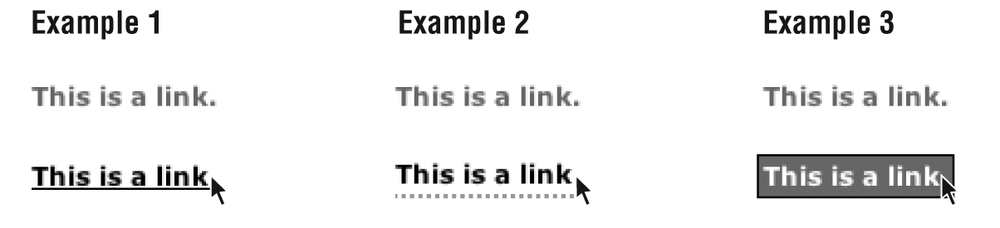
Figure 24-12. Examples of text rollover effects on links
    a:link {
        text-decoration: none;
        color: #666;
        }
In Example 1, the rollover changes the link to black and makes the underline appear.
    a:hover {
        text-decoration: underline;
        color: #000; }
Example 2 demonstrates a popular technique of using a fancy bottom border instead of the generic underline. A little padding is added to give the link enough space.
    a:hover {
        text-decoration: none;
        color: #000;
        padding-bottom: 2px;
        border-bottom: dotted 2px #999; }
In Example 3, both the foreground and background colors change on rollover. A border is thrown in for good measure.
    a:hover {
        text-decoration: none;
        color: #FFF;
        padding: 2px;
        background-color: #666;
border: solid 1px black; }Read now
Unlock full access


 O’Reilly covers everything we've got, with content to help us build a world-class technology community, upgrade the capabilities and competencies of our teams, and improve overall team performance as well as their engagement.I wanted to learn C and C++, but it didn't click for me until I picked up an O'Reilly book. When I went on the O’Reilly platform, I was astonished to find all the books there, plus live events and sandboxes so you could play around with the technology.I’ve been on the O’Reilly platform for more than eight years. I use a couple of learning platforms, but I'm on O'Reilly more than anybody else. When you're there, you start learning. I'm never disappointed.I'm always learning. So when I got on to O'Reilly, I was like a kid in a candy store. There are playlists. There are answers. There's on-demand training. It's worth its weight in gold, in terms of what it allows me to do.